























Integrations: Claude Code, Codex, Cursor and more
With a single Kadraris key, your coding agent, in an editor or a terminal, can write code using Claude, GPT and Gemini, and it can also make video, images and music. Use this page as an index: every tool has a short setup line here and a link to its detailed guide.
Three ways to connect
You can use any of these on its own or several at once.
- A different base URL. The tool sends its model requests to Kadraris rather than straight to the vendor. For Claude Code that is the Anthropic-style address
https://kadraris.com; for everything else it is the OpenAI-stylehttps://kadraris.com/v1. - MCP server at
https://kadraris.com/mcp. The agent gains tools for listing models, estimating cost, generating video and images, and reading the balance. This is the route to media from inside an agent. See MCP server. - AGENTS.md. A text file in your repository that documents the Kadraris API, so any agent working there knows how to call it. See AGENTS.md file.
Before anything else: a key
- Create an account and add funds (from $10, paid by card).
- In the dashboard, open API keys.
- Name the key after the tool, for example
claude-code, and set a Monthly limit. Somewhere around $10-20 is enough to begin with. - Press Create key and copy the
sk-kd-...value immediately, as it will not be shown again.
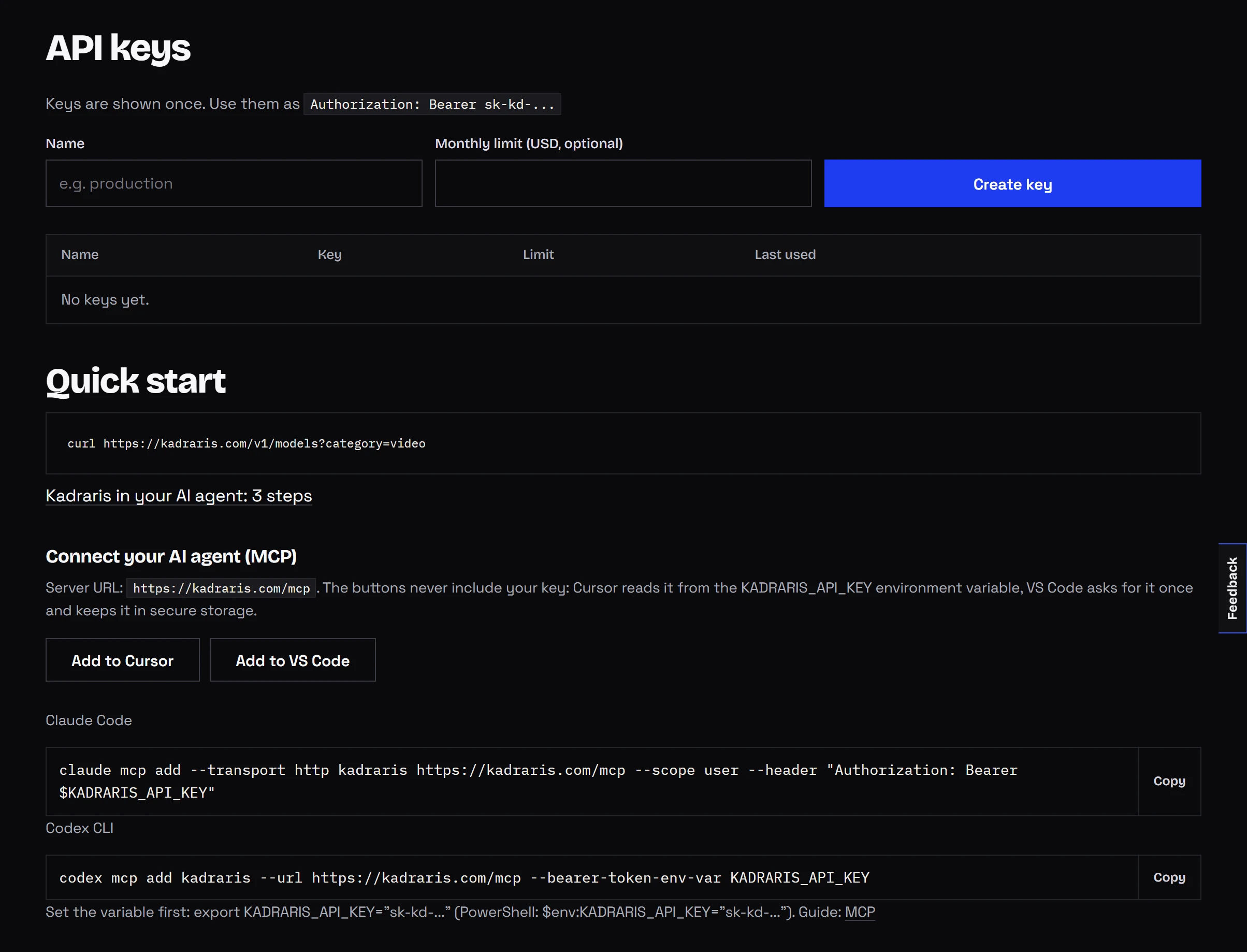
Give every tool its own key. If one of them misbehaves, you revoke that key and the others carry on.
Setup per tool
| Tool | Models through Kadraris | Media tools (MCP) | Read more |
|---|---|---|---|
| Claude Code | ANTHROPIC_BASE_URL=https://kadraris.com + ANTHROPIC_AUTH_TOKEN | claude mcp add --transport http kadraris https://kadraris.com/mcp --header "Authorization: Bearer sk-kd-..." | setup, MCP part |
| Codex CLI | no, see the Responses API note below | codex mcp add kadraris --url https://kadraris.com/mcp --bearer-token-env-var KADRARIS_API_KEY | Codex page |
| Cursor | Override OpenAI Base URL in model settings, value https://kadraris.com/v1 | .cursor/mcp.json holding url and headers | editor setup, MCP part |
| VS Code (Copilot agent mode) | - | .vscode/mcp.json with "type": "http" | MCP part |
| Cline | provider OpenAI Compatible, https://kadraris.com/v1 | remote server, Streamable HTTP | MCP part |
| Roo Code | provider OpenAI Compatible, https://kadraris.com/v1 | configured like Cline | editor setup |
| Claude Desktop and claude.ai | - | custom connector carrying the key header | MCP part |
| OpenCode | opencode.json using @ai-sdk/openai-compatible | opencode.json with "type": "remote" | editor setup |
| Aider | OPENAI_API_BASE=https://kadraris.com/v1 | - | editor setup |
| Zed | language_models.openai_compatible | - | editor setup |
| Continue | apiBase: https://kadraris.com/v1 | - | editor setup |
| n8n, Make, Zapier | an OpenAI node, or a raw HTTP call | an HTTP step that calls /v1/generate | No-code |
| Agents in general | - | - | AGENTS.md |
Where you see a dash, either the tool lacks that option or I have not checked its configuration against the vendor's own documentation.
Tools not listed here
Most apps have a setting labelled along the lines of "OpenAI-compatible", "custom endpoint" or "base URL". Enter these values:
| Setting | What to enter |
|---|---|
| Address | https://kadraris.com/v1 |
| Key | sk-kd-... |
| Model name | any id from the model list, such as claude-sonnet-5, gpt-6-sol or gemini-3.6-flash |
If the app can connect to a remote MCP server (Streamable HTTP transport), use https://kadraris.com/mcp with the header Authorization: Bearer sk-kd-....
Why Codex cannot run on Kadraris models
Kadraris accepts chat in two formats: POST /v1/chat/completions (OpenAI) and POST /v1/messages (Anthropic). It does not implement /v1/responses. Codex CLI currently only allows wire_api = "responses" for a custom model provider, which rules out using a Kadraris model as the model Codex thinks with. MCP still works, so Codex can generate video and images, look up prices and query other models through the chat tool. Details in Codex CLI with Kadraris.
Quick key check
Confirm the key is valid before you configure anything.
macOS and Linux:
curl https://kadraris.com/v1/balance -H "Authorization: Bearer sk-kd-..."Windows PowerShell:
Invoke-RestMethod -Uri "https://kadraris.com/v1/balance" -Headers @{ Authorization = "Bearer sk-kd-..." }If it works, you get your balance back, something like {"balance":"12.40","available":"12.40","currency":"USD",...}. A 401 tells you the key is wrong or has been revoked.
When the setup fails
| What you get | What to check |
|---|---|
401 | Does the key begin with sk-kd-? Is there a space at the end? Has it been revoked? |
402 | The balance is too low; add funds in the dashboard |
403 | The key's monthly limit is used up; create a replacement key with a bigger cap |
404 from chat | The model id is not in the catalog; compare it with Models |
| MCP server shows "failed" | The URL must end in /mcp, and the header must read Authorization: Bearer ... with the word Bearer and one space |