Anniversary Reel From Old Packaging: An AI Timeline Recipe
Plan a 20-second vertical reel where your packaging changes era by era - six matched images, frame-to-frame clips, macro shot, edit script and budget.
 Piotr Olszewski2026-10-227 minPolski
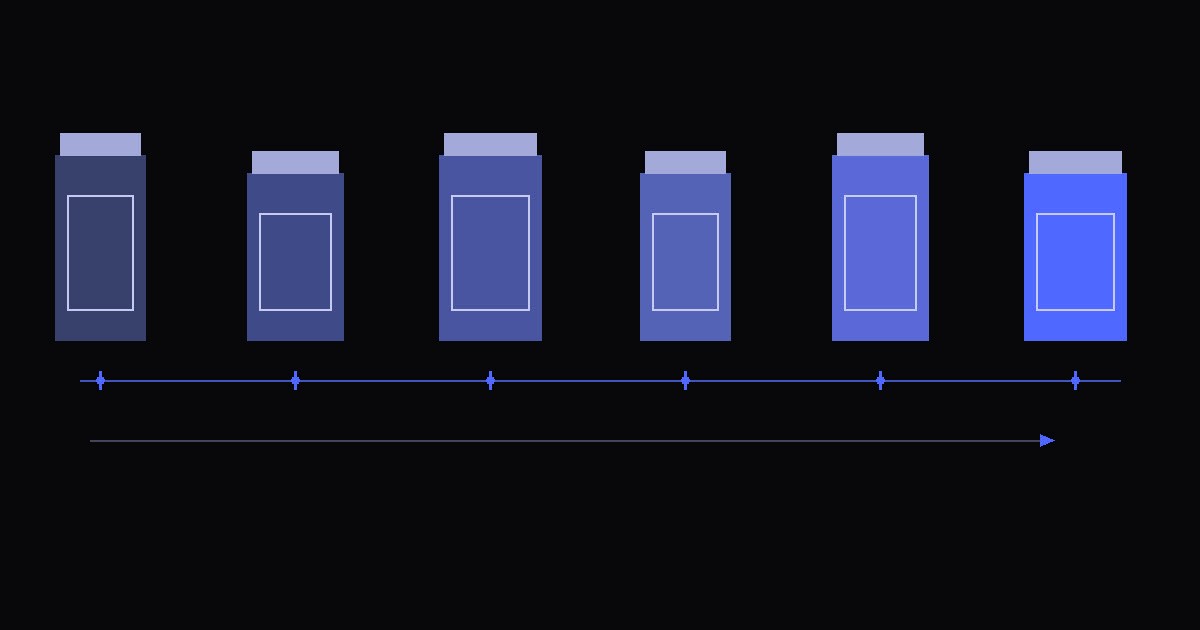
A brand anniversary does not need a voiceover to tell its story. Put six versions of the same package in front of one fixed camera, let each one morph into the next, then cut to a close detail, a macro of the product in use and a short logo card. All dates and text go in during editing, so a typo in a year never costs you a new video.
A note on what this is: a production recipe, not a review of paid model runs. I checked the editing commands locally on placeholder footage. A real packaging transformation still needs its own test and its own approved budget.
The reel, second by second (9:16, 1080x1920)
- 0-10 s: six product versions joined by five morphs, 2 s each after editing. Pale paper background, framing that never moves, a thin horizontal timeline with sliding years. Motion stays small.
- 10-12 s: camera moves in on the cap, thread or another detail people recognize on the current package.
- 12-18 s: macro of the product being used, for example cream coming out of your own tube. Product name and anniversary line go on as text layers.
- 18-20 s: your logo on a closing card, with room left for the Reels interface.
Ground rules before you start:
- Real dates only. Use years the brand history supports.
- Say what is reconstructed. If an old design is a reconstruction, the caption says so. Never pass off invented packaging as an archive piece.
- Your material. Work with your own product and with source files you have rights to.
Prepare the end card without AI
Start with the easy part. The closing card is your existing logo, a brand background color and the anniversary message, laid out locally. No generation is needed. If you want a richer background, you can generate one extra image as a backdrop and place the real logo over it in the editor. The budget below includes that optional image; drop its row if you build the card by hand.
Six package images from one model
Stick with GPT Image 2.5 for all six. Once you approve the first composition, send that image in image_urls for each later version and change only the era, material and colors.
Product photograph of {product}, packaging from {era}, material {material}, colors {colors}. Single product, centered, vertical frame. Pale matte paper background, soft key light from the left, light shadow falling right. Fixed camera, 85 mm lens, front view, same product scale and baseline. Whole package in frame with empty space above and to both sides. Keep the composition and position of the reference image. No text, dates, other brands' logos or extra props.How to keep the six images consistent:
- Six briefs. For example 1976, 1986, 1996, 2006, 2016 and 2026, if those years belong to your brand.
- Measure before you animate. Line up product height, center and baseline across all six. Fixing a mismatch now is far cheaper than after video.
- Use a preset size. Choose the portrait preset
1024x1536and pad to 9:16 without cropping. Kadraris validation accepts the predefined image sizes only, so do not send a custom size. - Same quality setting every time. Exact labels and logos come from brand artwork in the editor, not from the model.
- About seed: this model's schema in the catalog has no
seedfield. If you switch to a model that does, reuse the seed, but do not expect it to lock the framing on its own.
One image costs $0.05 per image. The Packaging timeline Studio starter loads the first image prompt for you.
Morph each pair of neighbors
Each transition takes two neighboring images: the earlier one as image_url, the later one as end_image_url. Both need the same aspect ratio and product position. Run get_model first, because a model that does image-to-video does not automatically accept an end frame.
| Model | Unit price now | Watch for in a trial |
|---|---|---|
| Seedance 2.5 | from $0.261 per second | product center and outline holding at both ends; pairs use adaptive ratio |
| Kling 3.0 | from $0.0963 per second | cap shape, stray objects; turn audio off here |
| PixVerse V6 | from $0.0405 per second | big material changes turning into a vague dissolve; test the same pair |
The budget table further down prices a 5-second, 1080p, silent clip for each model separately. A "from" unit price quoted at the cheapest setting is not what that clip costs. The table compares supported controls and money, not visual quality, which I have not measured with paid runs for this guide.
{
  "model": "seedance-2.5",
  "input": {
    "prompt": "Fixed camera. A single centered product morphs smoothly from the first packaging design into the second. Keep its position, size, lighting and paper background. Only slight rotation. No cuts, no new objects, no text.",
    "image_url": "https://your-domain.com/era-1.png",
    "end_image_url": "https://your-domain.com/era-2.png",
    "duration": 5,
    "resolution": "1080p",
    "aspect_ratio": "adaptive",
    "generate_audio": false
  }
}
Swap the sample URLs for files you host and that the API can reach. Five morphs at 5 s give you 25 s of raw footage, which you speed up to 2 s each. You pay for all 25 generated seconds even though they fill only 10 s of the reel.
Close detail and macro
- Push-in: use the final package image as the reference. Seedance 2.5 will not go below 4 s, so generate 4 s and keep 2 s in the edit.
- Macro: a separate 6-second shot. Match the closure, colors and light to the last package on the timeline.
Push-in: slow, precise camera move toward the closure of the reference product. Same soft light and paper background. Package shape does not change. No text, no cuts.
Macro: extreme close-up of that closure. A little cream slowly rises from the opening and forms a soft rounded swirl. Believable thickness, focus on the rim, steady light, no text.
Selling something other than cream? Show how that product is really used, and do not show properties it does not have.
Assemble the reel with ffmpeg
Before joining clips, bring frame rate, size and pixel aspect ratio to the same values. This command, which I ran on placeholder footage, keeps the full frame and pads the rest:
ffmpeg -i transition-1.mp4 -vf "trim=duration=5,setpts=0.4*(PTS-STARTPTS),fps=30,scale=1080:1920:force_original_aspect_ratio=decrease,pad=1080:1920:(ow-iw)/2:(oh-ih)/2:color=0xF2EFE8,setsar=1" -an -c:v libx264 -pix_fmt yuv420p transition-1-short.mp4Run it on all five morphs. Then cut the push-in to 2 s, the macro to 6 s and the end card to 2 s, and join everything in that order. The full editing script does all of it in one go:
bash packaging-timeline-montaz.sh input reel.mp4 5What the script expects and does:
- Inputs:
transition-1.mp4totransition-5.mp4,push.mp4,macro.mp4andoutro.pngin the input folder. - Text files (UTF-8):
years.txtfor the timeline,title.txtfor the macro title,tagline.txtfor the closing line. - Font: Arial by default on Windows. On macOS or Linux, point
FONT_FILEat a TTF you want to use. - Timeline: draws a line and slides the years with
drawtext. Nudge exact date positions in an editor if needed. - Sound: none. Add music you own or have licensed; music is not in the budget.
- Review: look at every cut and the last frame of every morph. Faster playback can reveal shape errors you missed at normal speed.
What the whole reel costs
The table is built from the live catalog when the page loads, in PLN with VAT and in USD. It covers 6 images, 5 morphs of 5 s, a 4-second push-in, a 6-second macro and the optional end-card background.
- Successful clips you throw away in editing are still charged.
- Failed generations cost $0.
- Retries and music are not included.
Before you send anything, check the cost calculator, pricing and the MCP guide. The packaging_timeline MCP recipe asks for a total estimate and your approval before it generates. When a real frame URL exists, estimate the dependent input again: confirmation tokens belong to a specific input and expire after 15 minutes.
Questions
Why not let the video model write the years on screen?
Lettering tends to warp while a package morphs. Years, the message and the logo stay sharp and easy to correct as editor layers.
How many seconds of video do I actually pay for?
About 35 seconds of generated footage (25 s of morphs, 4 s push-in, 6 s macro) plus 6 or 7 images, edited down to a 20-second reel. Extra successful attempts are billed on top.
What keeps the product in the same spot across six images?
The approved first image passed as a reference in image_urls, plus a prompt that fixes lens, view, scale and baseline. GPT Image 2.5 in this catalog has no seed input, so the reference does the work.
Can an AI agent run this recipe for me?
Partly. Over MCP an agent can look up models, estimate cost and start generations you approved. Downloading the files and the final edit happen on your machine.
What it costs at today's prices
Assumptions: 1080p, audio off, PLN with VAT, USD without taxes. A row = total price for the listed number of tasks. Retries and music are not included.
| Stage | Model | Count | PLN | USD |
|---|---|---|---|---|
| One image per era | GPT Image 2.5 | 6 | 1,76 zł | $0.30 |
| Era-to-era morphs, 5 s | Seedance 2.5 | 5 | 204,21 zł | $35.35 |
| Camera push-in, 4 s | Seedance 2.5 | 1 | 32,67 zł | $5.66 |
| Close-up macro, 6 s | Seedance 2.5 | 1 | 49,01 zł | $8.48 |
| End-card background (optional) | GPT Image 2.5 | 1 | 0,293 zł | $0.05 |
| Sum (with the end-card background) | 287,94 zł | $49.84 | ||
One 5-second transformation in three models
| Model | PLN | USD |
|---|---|---|
| Seedance 2.5 | 40,84 zł | $7.07 |
| Kling 3.0 | 3,51 zł | $0.619 |
| PixVerse V6 | 4,68 zł | $0.81 |