One Face, Many Shots - Holding a Character Steady in AI Pictures and Clips
How to get a consistent character in AI video and images: a master portrait, a frozen description, references for stills, the opening frame for clips.
 Piotr Olszewski2026-10-229 minPolski
The short version: a character stays the same when you show the model a picture of them, not when you describe them better. Make one master portrait, then hand it over as a reference in image_urls for still scenes, or as the opening frame in image_url for video. Words alone, however precise, give you a sibling of your character. When I ran ten models side by side, the clothes and accessories survived every scene; the faces did not. Below: the four-step workflow, the reference limit of every relevant model here, what a seed is good for, the limits, and a budget for a short piece.
The method in four steps
1. Make the master portrait
Start with a single image that defines the character from now on. A character sheet works best: a front close-up, a profile and a full-length view against a plain background in even light.
Character sheet of one woman on a plain light grey
background, soft even studio light: front close-up,
right profile close-up, full body standing. Around
40, short silver bob, small gold hoop earrings,
olive linen jacket, white shirt, dark trousers,
brown leather boots. Realistic photo, no text.
Faces are where models differ most, so I pick a strong one such as Nano Banana Pro (from $0.07 per image), make several candidates and keep the best.
2. Freeze the description
Copy one fixed paragraph about the person into each new prompt without editing it. Writing "silver bob" in one place and "short grey hair" elsewhere counts as two different orders. The character gets a name, and the paragraph lists only the fixed traits (age, face, hair, outfit). What changes per shot, the place, the action and the lighting, sits in its own sentences.
3. Build still scenes from the reference
Attach the portrait via image_urls (Studio has a reference field with an upload button for this) and say in the prompt that this is the person to show:
curl "https://kadraris.com/v1/generate?wait=60" \
  -H "Authorization: Bearer $KADRARIS_API_KEY" \
  -H "Content-Type: application/json" \
  -d '{
    "model": "nano-banana-pro",
    "input": {
      "prompt": "The woman from the reference image, same face, silver bob, earrings and olive linen jacket. She buys flowers at a street stall on a rainy morning, 50mm lens, realistic photo.",
      "image_urls": ["https://example.com/anna-sheet.png"],
      "aspect_ratio": "16:9",
      "resolution": "1k"
    }
  }'
Always set the aspect ratio: left out, Nano Banana Pro copies the shape of the first reference. Hold each new scene next to the portrait and compare the eyes, the nose and the jaw.
4. Move to video: first frame or references
There are two ways to get the character moving:
- Opening frame (
image_url). A still from step 3 starts the clip and your prompt talks only about motion. Since the clip literally begins on your picture, the face is locked at the start. The guide to animating stills goes further. - References (
image_urls). The shot is invented fresh, with appearance borrowed from what you supplied. You gain camera freedom and lose some control over the face.
My own try of the reference route was in September 2026, on Kling 3.0 Omni via a different provider (Kadraris does not offer that Kling mode). One frame from an older clip, a woman seated in her kitchen, served as the reference; the prompt had her stand, go over to the window and speak. Her looks and clothes carried over and she did every step. Yet she spoke with her back turned, which made the mouth movement impossible to check. My write-up in Polish: Kling 4.0 Omni Reference.
Why a prompt alone is not enough
Image models keep no memory between runs. Each one grows out of random noise chosen by the seed, with the prompt merely nudging the result. Whatever the prompt leaves open is decided again from scratch.
A quick local experiment with Z-Image Turbo, one prompt and three seeds:
portrait of a fisherman in a yellow raincoat on a
pier, overcast light, 85mm lens, realistic skin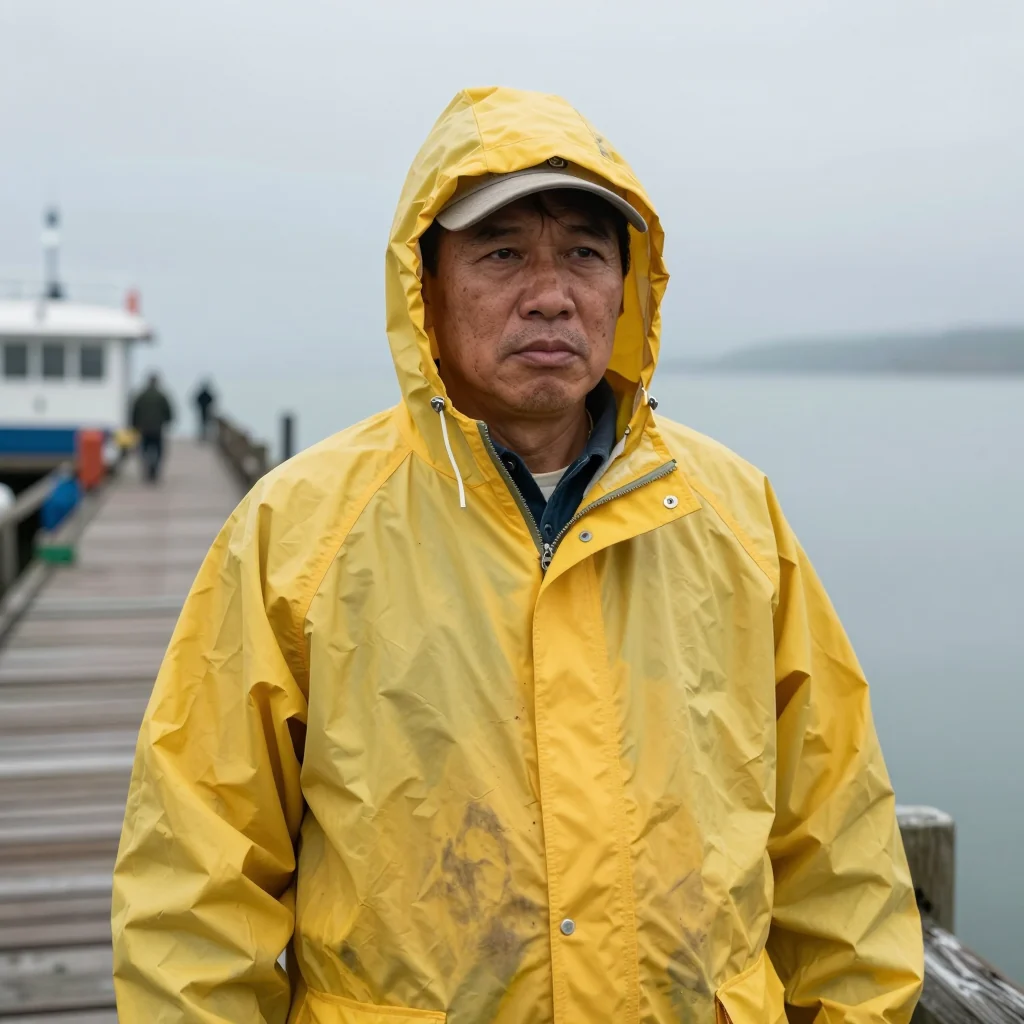
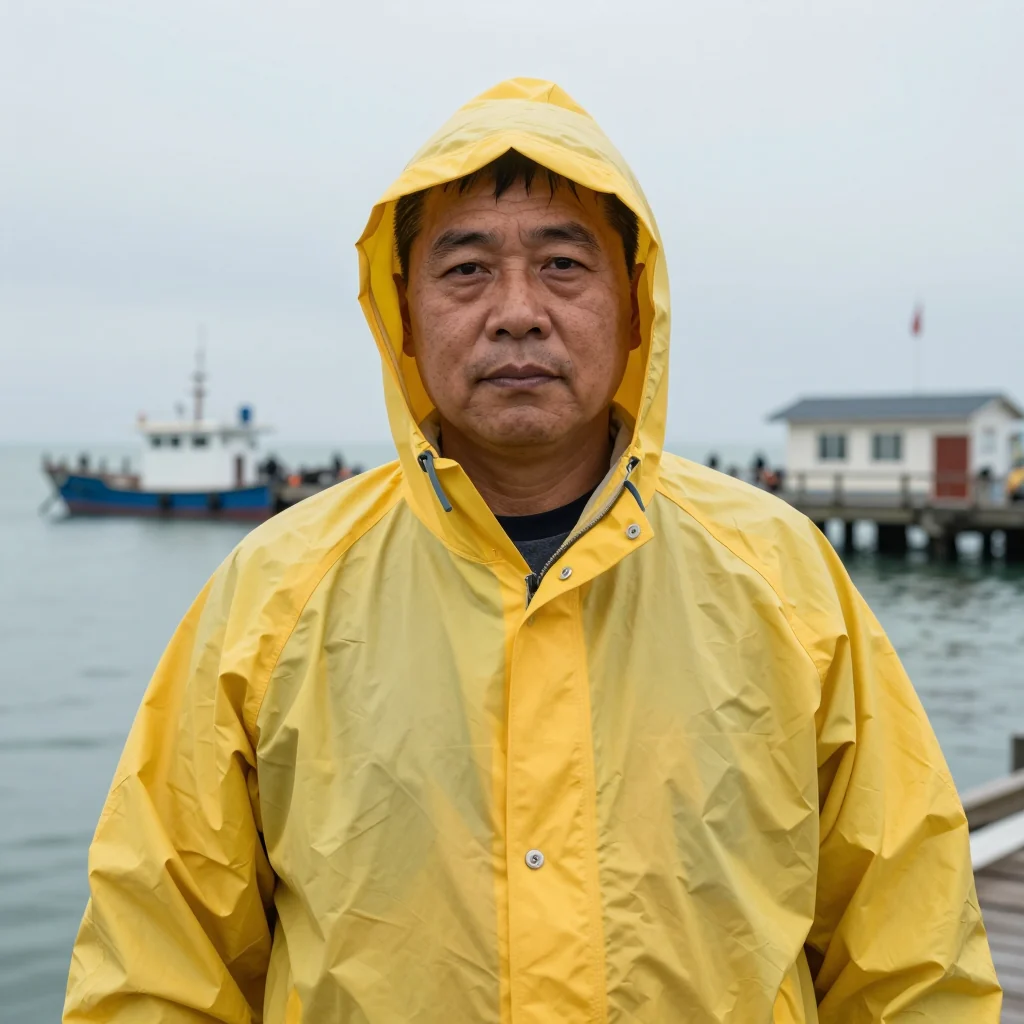
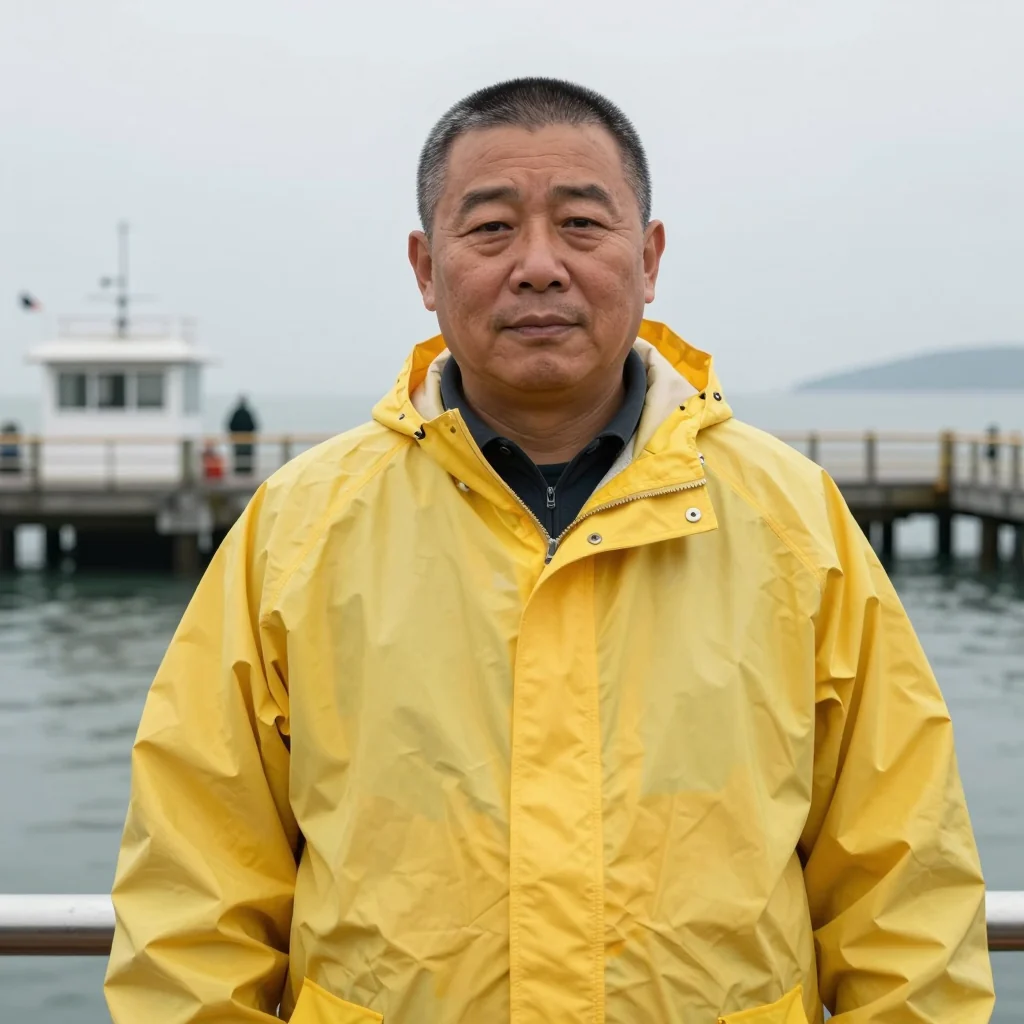
All three match the text: yellow raincoat, pier, grey sky. And all three are different men, with different ages, faces and hair. The prompt said nothing about the face, so the model chose a "type" on its own each time. Every generator behaves like this: words set the category, the face is a roll of the dice.
Ten models, one character, four scenes
Back in June 2026 I ran a character test for promptowy.com across ten models. The subject: Marek, 35, with a short dark beard, round glasses, untidy brown hair and a mustard jumper. He was placed in four situations (coffee shop, cycling, office, night rain), always with the identical text and seed and never with a picture. The results boards are on my blog, in Polish.
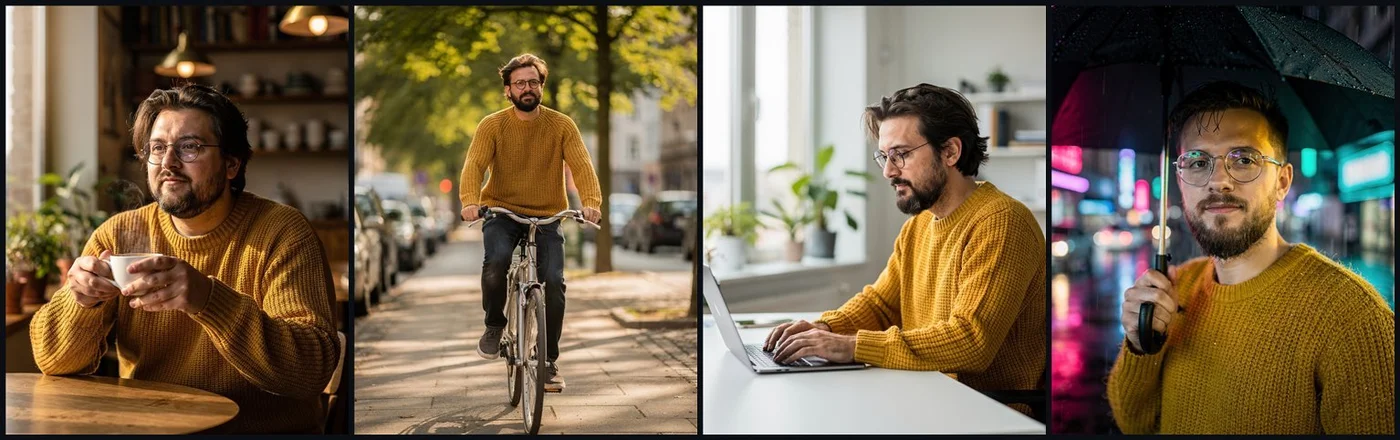
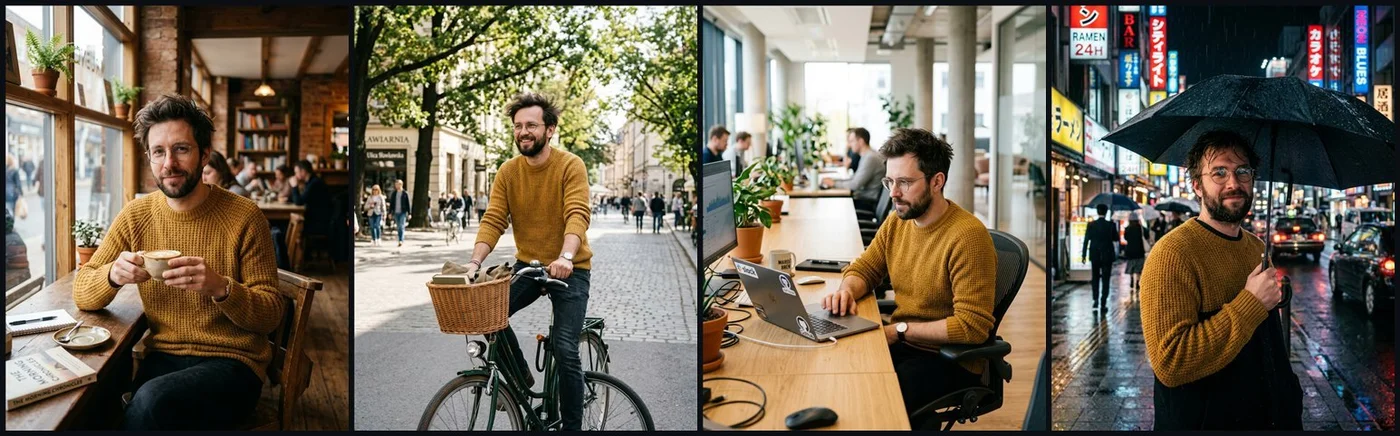
What I learned:
- Props held everywhere. Glasses, beard, jumper and hair made it through all four scenes in every model. Keeping the type of character is a solved problem.
- Faces did not. The steadiest was Seedream 4.5, with Photon and FLUX.2 [pro] next. In the rain scene GPT Image 2 wavered slightly.
- Nano Banana 2 finished last, even though it is advertised for consistency. Its cafe, bike and rain shots looked like three men who share a jumper.
So a description buys you someone similar. The same person needs a reference.
How many references each model takes
Limits as listed in the Kadraris catalog. Stills and the portrait come from image models; movement comes from video models.
Image models (none take a first frame):
| Model | Max references | Seed field |
|---|---|---|
| GPT Image 2.5 | 16 | absent |
| Nano Banana Pro | 14 | absent |
| Nano Banana 2 | 14, with 4 advised for people | absent |
| Seedream 5.0 Pro | 10 | absent |
| FLUX.2 [pro] | 8 | absent |
| FLUX.1 Kontext [pro] | 4 | available |
Video models:
| Model | Max references | Starting image, seed |
|---|---|---|
| Seedance 2.5 | 30 | both supported |
| Wan 3.0 | 10 | both supported |
| MiniMax H3 | 9 | starting image only |
| HappyHorse 1.1 | 9 | starting image only |
| PixVerse V6 | 7 | both supported |
| Kling 3.0 | none | start and end image, no seed |
From the model specs:
- Naming references in the prompt differs per model: HappyHorse 1.1 reads
[Image 1],[Image 2]; Wan 3.0 reads "Image 1", "Video 1"; the producer's Seedance 2.5 sample uses "@Video 1". Labels help once there is more than one character. - MiniMax H3 charges extra for references six to nine.
- According to its spec, Seedance 2.5 accepts references that show real people. Other models may filter real faces; a task rejected on Kadraris costs $0.
Seedance 2.5 can also lengthen a finished clip and keep the same people in it, which is another way to stay consistent through a longer scene:
Your own movement with Motion Control
When the character must do a specific move, such as a dance, a gesture or a walk, Kling 3.0 Motion Control combines a character picture (image_url) with your motion clip (video_url). Appearance is taken from the still, motion from the footage. Billing is $0.249 per second, measured on how long your motion clip runs.
What a seed is good for
Repeat model, prompt and seed and you repeat the picture. Alter the setting and the face wanders regardless; Marek had a single seed throughout and still changed. I use a seed for:
- tweaking one or two words in a shot I already like,
- A/B checks, such as a fixed seed tried once with a reference and once without,
- repeatable series, where the model has the field at all (see the table).
A seed reproduces an image. Only a reference keeps a face.
Where every model still slips
Even with good references, plan for this:
- profiles and wide shots drift more than close-ups from the front,
- small clothing details like logos, knit patterns or jewellery change between shots,
- two people in one frame can merge, swapping features,
- 20-30 second clips give the face far more chances to wander than short ones,
- strong emotions in the prompt shift the expression and the apparent age.
So my plans always assume a second take for every shot.
A budget for one character in six shots
Say one person appears in six shots of 5 seconds each:
| Step | Model | Count | Total |
|---|---|---|---|
| master portrait | Nano Banana Pro | 4 versions | 4 × from $0.07 per image |
| stills with reference | Nano Banana Pro | 6 scenes, 2 tries each | 12 × from $0.07 per image |
| video from first frame | Seedance 2.5 | 6 × 5 s × 2 tries = 60 s | 60 × from $0.261 per second |
Seedance's "from" figure is for the smallest resolution, and larger ones raise it (tiers on the model page). Studio prints the price before each run and the API hands it back in estimated_cost. A failed render costs $0. For other models' per-second math, see the cost-per-second guide, and keeping a performer consistent in a music video is covered in AI music video. You can try the whole method in Kadraris Studio.
Questions
What should my master portrait look like?
Sharp, evenly lit, on a plain background, ideally a sheet with a front close-up, a profile and a full-length view. Avoid strong shadows, sunglasses or hair covering the face, because the model copies whatever the reference shows.
Should I use the first frame or references for video?
Use the first frame when the face matters most, since the opening second is exactly your image. Use references when you need a new camera angle or framing and can accept a little more drift.
Which models held a face without any reference in your test?
Seedream 4.5 came first, Photon and FLUX.2 [pro] next, and Nano Banana 2 last. Once you add a reference the gap narrows, so choose on picture quality and on how many references you need.
Can I build a character from a photo of a real person?
Only if they agree to it. Certain models block real faces, and a refused task on Kadraris is not charged.