Make a Character Dance With AI - Kling Motion Control Guide
Put your own dance moves on a character from a single photo with Kling Motion Control 3.0 or 2.6: how to film, clip limits, per-second cost, Studio and API.
 Piotr Olszewski2026-10-228 minPolski
You record yourself doing a dance, a wave or a short piece of acting. You add a picture of a character: a mascot, an illustrated hero, a person who agreed to it. Motion control combines the two, so the character performs your moves while keeping its own look. Kadraris offers two Kuaishou models for this: Kling 3.0 Motion Control ($0.249 per second) and the cheaper Kling 2.6 Motion Control ($0.138 per second). Both bill by the length of your source clip, so an 8-second dance on 3.0 costs 8 × $0.249 per second.
Record a clip the model can follow
The quality of your source recording matters more than any setting. These rules come from how the model reads movement:
- Keep the whole body visible, from head to feet, for every frame. A hand that leaves the frame is motion the model never sees.
- Use a tripod. Only the dancer should move. A moving camera gets mistaken for body movement.
- Plain background, good light, one person. Nobody walking through the shot.
- One continuous take. No cuts, no transitions.
- Cut it to the move. You pay per source second, and the clip must be 3 to 10 seconds. Split a longer trend into two parts.
- Match the orientation of the character image. For TikTok, record vertically and use a vertical picture.
Pick a character image that fits the clip
- Show the full figure in a pose close to your first frame. If you start facing the lens with your arms down, the picture should match.
- Keep body proportions similar. A character with very different build from the dancer tends to get strange limb motion.
- Face and outfit clearly visible. The model cannot add detail it cannot see.
- Drawn characters work. Mascots, illustrations and game heroes are fine: appearance is read from the picture, never from your recording.
Have no character? Create it in an image model before you start. To keep one character steady across a whole series, read consistent characters in AI video.
The three inputs explained
Every job takes:
- a character image (
image_url): it defines appearance, face, clothes and style, - a motion clip (
video_url): it defines the movement, steps, gestures and facial expression; MP4 or MOV, max 100 MB, 3 to 10 seconds, - a prompt: required, but used for scene, light and mood rather than for motion.
Set quality to std, the default, or pro. The second option is billed at a higher rate per second; Studio refreshes the price the moment you switch.
Kadraris runs the mode where body orientation is taken from the picture, and that mode caps clips at 3-10 seconds. Kuaishou also has a mode where orientation follows the video and clips can run to 30 seconds, but Kadraris does not offer it yet. Audio from your source clip is carried into the result, and there is no option to drop it yet.
3.0 versus 2.6
| Kling 3.0 Motion Control | Kling 2.6 Motion Control | |
|---|---|---|
| Release | March 2026 | December 2025 |
| Character consistency | better | weaker |
| Source clip | 3-10 s, MP4/MOV, 100 MB | 3-10 s, MP4/MOV, 100 MB |
| Price (std) | $0.249 per second | $0.138 per second |
Each has std and pro. 3.0 keeps the face and clothing more stable during movement, so I use it for anything I publish. 2.6 has the lower per-second rate, so I use it to rehearse choreography, framing and the character picture before the final render. For a long series of simple trend clips with a cartoon mascot, 2.6 might be enough on its own.
Below are Kuaishou's own 3.0 demos. They come from Kuaishou's app with a character-binding tool that Kadraris lacks, so see them as a preview of the model's range rather than a promise:
Kuaishou's 2.6 demos, one of them with a cartoon fighter and one built around hand shapes:
Price per job
Billing counts each begun second of your recording; the output length does not matter:
| Job | Seconds | Cost |
|---|---|---|
| 8 s dance on 3.0 std | 8 | 8 × $0.249 per second |
| same dance as a 2.6 test | 8 | 8 × $0.138 per second |
| five 6 s tests on 2.6, then one 6 s final on 3.0 | 36 | 30 × $0.138 per second + 6 × $0.249 per second |
| mascot series, 10 × 10 s on 2.6 | 100 | 100 × $0.138 per second |
Figures are for std; pro is more expensive. Funds are prepaid in USD, nothing renews, and money left on the account never lapses. For a 4K delivery, run the result through the steps in upscaling AI video to 4K. Rates for all Kling models are collected in Kling 3.0 API pricing.
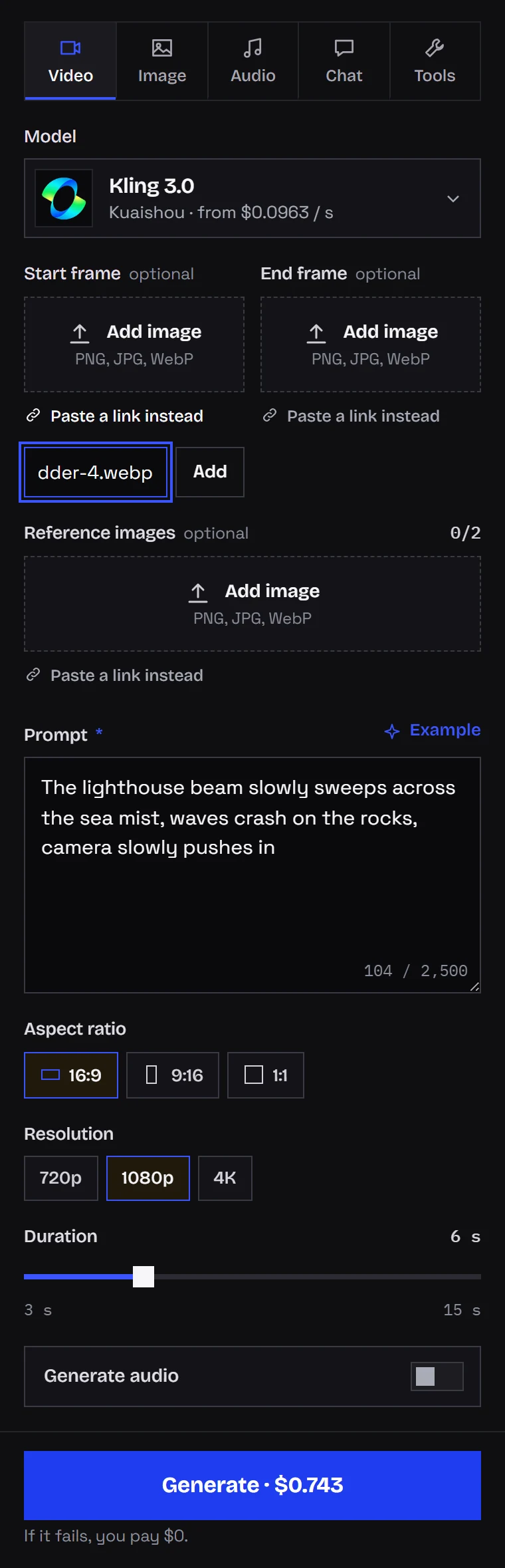
In Kadraris Studio
- Sign up and add at least $10.
- Go to the Video tab and set Model to one of the two Motion Control versions.
- Describe the scene in Prompt, for example "white photo studio, soft light, plain paper backdrop, music video feel".
- Set Quality to
stdfor drafts orprofor the final. - Your character picture goes into Start frame (URL) via Upload file.
- Your recording goes into Source video (URL). Direct uploads are capped at 25 MB (MP4, MOV); anything bigger, to 100 MB, needs a public URL.
- Click Generate; the finished clip lands in the gallery for download.
The amount next to Cost is a hold, not the final bill. Kadraris only learns the clip length after downloading it, so it first holds 120 seconds' worth, on 3.0 std that is 120 × $0.249 per second. After the job it charges the real number of source seconds (rounded up) and frees the rest immediately. Because that hold has to be covered by your balance, a small account is better off beginning with 2.6.
Through the API
All fields sit inside input: prompt, image_url, video_url and optional quality.
curl https://kadraris.com/v1/generate \
  -H "Authorization: Bearer $KADRARIS_API_KEY" \
  -H "Content-Type: application/json" \
  -d '{
    "model": "kling-3.0-motion-control",
    "input": {
      "prompt": "White studio, soft light, plain paper backdrop",
      "image_url": "https://your-server.com/characters/mascot.png",
      "video_url": "https://your-server.com/motion/dance-8s.mp4",
      "quality": "std"
    }
  }'
The 202 reply includes the task id and estimated_cost, which reflects the 120-second hold. To apply one dance to several characters, loop over them:
import os, time, requests

API = "https://kadraris.com/v1"
KEY = os.environ["KADRARIS_API_KEY"]
HEADERS = {"Authorization": f"Bearer {KEY}"}
MOTION = "https://your-server.com/motion/dance-8s.mp4"
cast = {
    "mascot": "https://your-server.com/characters/mascot.png",
    "robot": "https://your-server.com/characters/robot.png",
}

for name, image in cast.items():
    body = {
        "model": "kling-2.6-motion-control",
        "input": {"prompt": "Light studio, soft shadows",
                  "image_url": image, "video_url": MOTION,
                  "quality": "std"},
    }
    task = requests.post(f"{API}/generate", headers=HEADERS,
                         json=body, timeout=30).json()
    # poll every 10 s until the task finishes
    while task["status"] not in ("succeeded", "failed"):
        time.sleep(10)
        task = requests.get(f"{API}/tasks/{task['id']}",
                            headers=HEADERS, timeout=30).json()
    if task["status"] == "succeeded":
        url = task["output"][0]["url"]
        with open(f"{name}.mp4", "wb") as f:
            f.write(requests.get(url, timeout=300).content)
    print(name, task["status"], task.get("cost"))
When the status is succeeded, output contains the video (type: "video") and cost tells you what was finally billed. For larger batches, set webhook_url and skip polling (webhooks). Clips shorter than 3 or longer than 10 seconds are rejected, and failed tasks cost $0.
What it will not do (yet)
- Long clips. Recordings over 10 s are refused; Kuaishou's 30-second variant has not been added.
- Removing source audio. Whatever played in the background of your recording ends up in the result. Add music later from the platform's own sound library.
- Multi-image characters. One picture defines the character; there is no way to combine several references.
- Perfect hands in fast moves. Hands and faces can blur during quick motion, so check the result slowly, frame by frame, before it goes online.
- Anyone's face without permission. Get consent from every real person involved, whether in the picture or the recording, and keep celebrities out.
If you only have a still and nothing to copy movement from, the image-to-video guide is the better route. Vertical publishing is covered in short-form AI video for TikTok and Reels.
Questions
Why is my character's arm bending strangely?
Usually the body shapes do not match: the dancer and the character differ a lot in proportions, or a limb left the frame in the source clip. Re-record with the full body visible and use a character image in a similar starting pose.
Do I need to dance well for this to work?
No. The model copies what it sees, so clear, steady movement matters more than skill. A simple routine filmed on a tripod in good light beats an impressive one filmed handheld.
Can I use the result with a trending song?
Do not rely on the song in your source clip, because its audio is copied into the output. Add the track inside TikTok or Instagram from their licensed library after you upload.
How do I keep the cost down while experimenting?
Trim the source to the shortest useful length, run all tests on 2.6 std, and render only the approved version on 3.0. Nothing is free here, though a failed run costs $0 and you can start with $10.