Using Google's Gemini Omni Through Kadraris - Flat Clip Price, Modes, Code
Gemini Omni API (original and 1.1) on Kadraris: price per clip by length and size, prompts, first frames, three-image fusion, clip edits and code.
 Piotr Olszewski2026-10-228 minPolski
Give Gemini Omni a prompt, an opening image, a trio of pictures or footage you already shot, and it returns 4 to 10 seconds of video. Kadraris charges per clip, and the price grows with the length you pick: for the default 6 seconds, Gemini Omni 1.1 is from $1.02 per video and the first release, Gemini Omni, is from $1.45 per video. This guide sets out the accepted values, the price logic, how each input mode maps to the API (including what Google shows that the API does not take yet), Studio steps and request code.
A video model built around references
Google unveiled Omni during its May 2026 developer conference, describing it as a model that accepts any kind of input and launching with video; that debut version carries the Flash name. Version 1.1 came in August (gemini-omni-1.1-flash in Google's documentation). The ids on Kadraris are gemini-omni and gemini-omni-1.1.
Where most text-to-video models start from words, Omni starts from material. It can pin a photo as the opening frame, borrow a person's look from one, blend three pictures into a single scene, or rework footage according to a written request. Google markets that last ability as editing video through conversation.
Values the API accepts
Taken from the model schema on Kadraris:
| Field | Gemini Omni | Gemini Omni 1.1 |
|---|---|---|
duration | 4, 6, 8 or 10 s | 4, 6, 8 or 10 s |
aspect_ratio | 16:9, 9:16 | 16:9, 9:16 |
resolution | 720p to 4k (three sizes) | 360p to 4k (four sizes) |
prompt | max 2,000 characters | max 2,000 characters |
image_url | one start frame | one fixed start frame |
image_urls | exactly 3, fused | 1 or 3, subject or style |
video_urls | a single source of 30 s at most; only its opening 10 s count | a single source of 30 s at most |
No square format, and no length between the listed values. Anything else returns 422, and the error names the field.
Price per clip and what follows from it
Other video models here mostly charge by the second. Omni charges by the clip, and two settings move the price: length and output size. The table shows the default 6 seconds:
| Model | 720p or 1080p, 6 s | 4K, 6 s |
|---|---|---|
| Gemini Omni 1.1 | from $1.02 per video | twice the 1080p price |
| Gemini Omni | from $1.45 per video | twice the 1080p price |
Four practical consequences:
- Length is part of the price. Against 6 seconds, a 4-second clip costs a quarter less, 8 seconds a quarter more and 10 seconds one and a half times as much. 4K adds the same fixed sum at every length, so at 4 seconds it more than doubles the bill and at 10 seconds it adds about two thirds.
- Ask for 1080p. Full HD and 720p share one price, so lower sizes only make sense if a downstream tool demands them.
- 360p on 1.1 saves nothing. Google describes 360p as a draft size, but here it is billed like 720p. I draft at 720p and get something usable out of it.
- Pick 1.1 for new work. When I wrote this, each of its tiers cost less than the first release's, and the request body does not change.
Before anything renders, estimated_cost tells you what this exact request will cost, and that sum is reserved. A render that errors out frees the whole reservation. You pay in dollars up front, from $10, with no plan to cancel and no date when the money runs out. All model rates: pricing.
Each input mode, and how it maps to the API
Text only
A prompt, a length, a size and a ratio. The simplest mode, shown in the first code example below.
Three images merged into one shot
Works exactly as Google describes. List three links in image_urls, then tell the prompt what each one is, for instance the person, the object and the location. The first release insists on precisely three and rejects a pair. Version 1.1 treats image_urls as references for subject or style and takes either one or three; a lone image_url instead pins the opening frame.
Changing an existing clip with an instruction
Upload footage and say what to alter. Google's showcase swaps a statue for one built from bubbles while the camera, light and surroundings remain.
Here that means: footage goes into video_urls, the request into prompt, and duration stays out since the source decides it. The API keeps no chat thread. Every further change is a separate job fed with the last output, and the record of edits lives in your own notes or database.
Morphing from a first to a last frame
For version 1.1, Google's documentation demonstrates a morph across two keyframes: a leafy woodland at dawn ends as the same woods under snow and stars.
That one is not available here for now: Omni on Kadraris accepts an opening image via image_url and offers no field for the closing one. For a morph today, use MiniMax H3 or MiniMax H3 Max, which both read end_image_url; see the MiniMax H3 guide.
Continuing a shot
Google's documentation also shows footage being prolonged while a person taken from a separate picture strolls into view and greets the camera.
To approximate it here, combine footage in video_urls, a prompt that asks for the shot to continue, and the person's picture in image_urls. I have not tested this mix myself, so render a single 720p job before you commit to a series.
In the browser, without code
Both Omni versions are also in Kadraris Studio, billed from the same funds:
- Register and load at least $10.
- Switch to the Video tab and pick Gemini Omni 1.1.
- Describe the shot, then set shape, size and seconds.
- Starting from a picture? Expand Start frame to upload one or paste its address.
- Confirm the amount next to Cost and hit Generate.
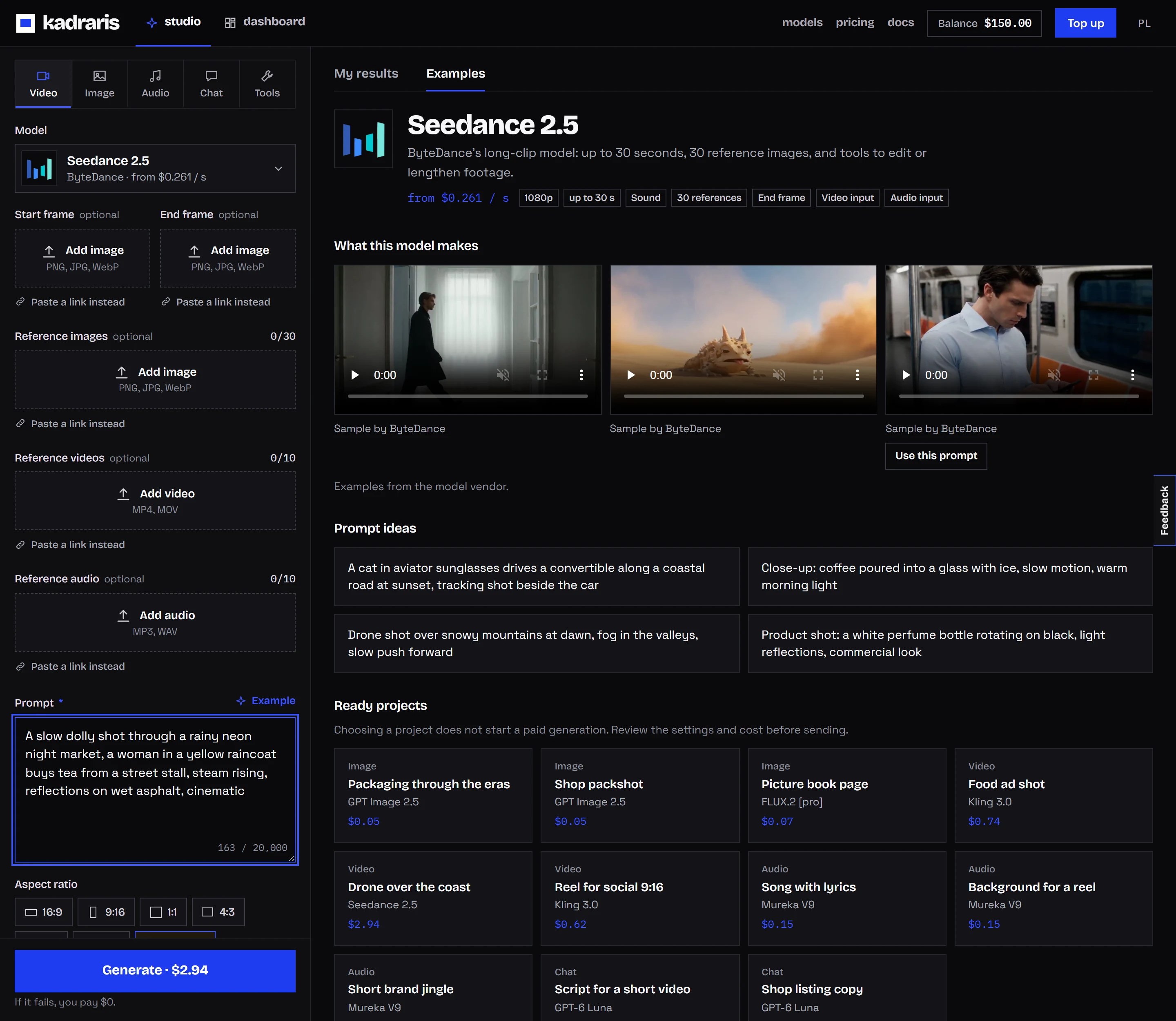
Studio hides any field the selected model cannot use, and your history keeps every finished clip.
Requests in code
Make a key under the dashboard (steps in the quickstart) and store it as an environment variable:
export KADRARIS_API_KEY="sk-kd-..."Text to video
curl https://kadraris.com/v1/generate \
  -H "Authorization: Bearer $KADRARIS_API_KEY" \
  -H "Content-Type: application/json" \
  -d '{
    "model": "gemini-omni-1.1",
    "input": {
      "prompt": "Aerial glide over terraced vineyards at dawn, thin mist in the valleys, slow forward motion, warm light",
      "duration": 8,
      "resolution": "1080p",
      "aspect_ratio": "16:9"
    }
  }'
The reply is a 202 with the task id, estimated_cost and poll_url.
Three images in one shot
{
  "model": "gemini-omni",
  "input": {
    "prompt": "The cyclist from image 1 rides the vintage bicycle from image 2 across the old harbour from image 3, side tracking shot",
    "image_urls": [
      "https://example.com/refs/cyclist.jpg",
      "https://example.com/refs/bicycle.jpg",
      "https://example.com/refs/harbour.jpg"
    ],
    "duration": 6,
    "resolution": "1080p",
    "aspect_ratio": "9:16"
  }
}
Editing a clip you already have
{
  "model": "gemini-omni-1.1",
  "input": {
    "prompt": "Keep the camera path and the people, turn the afternoon into a stormy evening with wet streets",
    "video_urls": ["https://example.com/clips/square.mp4"],
    "resolution": "1080p",
    "aspect_ratio": "16:9"
  }
}
Note the missing duration: pairing it with video_urls triggers a 422.
JavaScript: submit, wait, save
import { writeFile } from "node:fs/promises";

const API = "https://kadraris.com/v1";
const headers = {
  Authorization: `Bearer ${process.env.KADRARIS_API_KEY}`,
  "Content-Type": "application/json",
};

const res = await fetch(`${API}/generate`, {
  method: "POST",
  headers,
  body: JSON.stringify({
    model: "gemini-omni-1.1",
    input: {
      prompt: "A kite tugs against the wind above sand dunes, " +
        "low angle, grass shaking in the foreground",
      duration: 6,
      resolution: "1080p",
      aspect_ratio: "9:16",
    },
  }),
});
let task = await res.json();
if (res.status !== 202) throw new Error(task.error.message);
console.log("task", task.id, "estimated", task.estimated_cost);

// back off gradually, up to 20 s between checks
let delay = 5000;
while (!["succeeded", "failed"].includes(task.status)) {
  await new Promise((r) => setTimeout(r, delay));
  delay = Math.min(delay * 1.5, 20000);
  const r = await fetch(`${API}/tasks/${task.id}`, { headers });
  task = await r.json();
}

if (task.status === "succeeded") {
  const file = await fetch(task.output[0].url);
  const data = Buffer.from(await file.arrayBuffer());
  await writeFile(`${task.id}.mp4`, data);
  console.log("saved, cost", task.cost);
} else {
  console.log("failed, nothing charged:", task.error);
}
Output links are temporary; save the file as soon as it exists. Running many jobs? Supply webhook_url and skip the loop; how to verify the signature is explained in the webhook docs, and the generate docs list all fields.
Omni or Veo 3.1
Same company, different jobs. Omni is my tool when the raw material exists already, be it footage to rework, a portrait to keep, or three parts to merge. For something built from a blank page, with careful light and built-in audio, I go to Veo 3.1 (Quality); its rates are in Veo 3.1 API pricing, and the two are compared on Gemini Omni 1.1 vs Veo 3.1. Animating a single photo instead? The image-to-video guide lays out the choices, and camera moves for AI video helps you spell out motion precisely. Every other video model is in the video API comparison.
Questions
Why did my request return 422 when I sent a clip?
Usually duration slipped in next to video_urls. An edit inherits its length from the footage, so drop that field. The error message names the field that caused it.
Does a 10-second clip cost more than a 4-second one?
Yes. Omni is billed per clip, but the price follows the length: at a given size, 10 seconds costs twice as much as 4 seconds. Studio and estimated_cost show the exact sum for the length you set.
Can I make square video with Gemini Omni?
Not on Kadraris. The accepted ratios are 16:9 and 9:16. For 1:1, Kling 3.0 is one of the options.
How do I keep revising the same clip?
Send each new instruction as a fresh task, with the previous result as the input in video_urls. Keep the task ids and prompts on your side, since there is no saved conversation between tasks.