What a Veo 3.1 Clip Costs: Quality, Fast and Lite Explained
Veo 3.1 API pricing in plain numbers - one flat price per 8-second clip for Quality, Fast and Lite, 720p equal to 1080p, 4K surcharges, plus code to try it.
 Piotr Olszewski2026-10-228 minPolski
In Kadraris, Google's Veo 3.1 comes in three tiers, each with one price per clip: from $2.53 per video for Veo 3.1 (Quality), from $0.354 per video for Veo 3.1 Fast and from $0.177 per video for Veo 3.1 Lite. Each run yields 8 seconds of video. Choosing 1080p instead of 720p changes nothing on the bill; only 4K is priced higher. You skip the Google AI plan and the Cloud project: a single key, money added in advance (at least $10), and a visible price before anything renders.
Price table
Veo is charged per video, not per second. Since the length is always 8 seconds, the clip price is the price of one 8-second shot.
| Tier | 720p or 1080p | 4K |
|---|---|---|
| Veo 3.1 (Quality) (Quality) | from $2.53 per video | about 1.5 × the 1080p price |
| Veo 3.1 Fast | from $0.354 per video | about 4.6 × the 1080p price |
| Veo 3.1 Lite | from $0.177 per video | about 8 × the 1080p price |
Inputs by tier:
- Quality: a prompt, optionally with as many as 3 pictures acting as frames.
- Fast: a prompt, optionally with 3 pictures that serve either as frames or as a look to match.
- Lite: a prompt and nothing more.
Resolution-by-resolution figures: model pages and pricing. Global prices are in USD, before tax.
How I read those numbers:
- Take 1080p over 720p. The price is identical, so 720p only makes sense when you want a smaller file.
- Quality is several times the price of Fast. For one hero shot that hardly matters; for twenty variations it does.
- Lite loses its edge at 4K. Half the Fast price at 1080p turns into almost the same price at 4K. For 4K I go with Fast or Quality, which also take images.
Failures cost $0, since the reserved amount is fully returned. A clip that renders but disappoints you is billed, which is why my experiments happen on Fast and Quality gets just the final prompt.
Choosing a tier
Shared by all three: 16:9 or 9:16 framing, 720p/1080p/4K output, prompts of up to 4,000 characters. What separates them is picture quality and inputs:
- Veo 3.1 (Quality): the finest picture, richest lighting and texture. Pictures (3 max) act as frames, such as where the shot begins. Anything I publish comes from here.
- Veo 3.1 Fast: renders sooner and costs far less. A picture can set a frame or show what a person or product must look like. I reach for it first on reels and experiments.
- Veo 3.1 Lite: lowest price, launched March 2026. Words are the only input, so describe everything. Handy for B-roll, filler shots and many takes on one concept.
Since each output is 8 seconds, anything longer is assembled in editing. A single extended take with sound calls for Seedance 2.5 (30 s max) or Gemini Omni, which runs longer and accepts reference video (details: Gemini Omni API guide).
Sound and 4K
Audio. Google designed Veo 3.1 to produce a soundtrack together with the image: sound effects, room tone, and quoted lines of speech. Kadraris shows no sound toggle for Veo and adds nothing for audio; a tier costs one amount per clip. Two tips:
- Listen before a batch. When sound is important, make a single clip and hear it before ordering more.
- Dialogue language. There is no official list of languages Veo can speak. Quoted English lines are the reliable option.
4K. Google's consumer subscriptions reserve 4K for the most expensive plan. Over the API, resolution: "4k" works with Quality, Fast and Lite alike. These are Google's official 4K samples:
Go for 4K if the editor will zoom or recrop the shot, or if it ends up on a big display. Phone-sized vertical video looks fine at 1080p, which on Veo is priced like 720p anyway.
Veo 3 or Veo 3.1?
Searches for "Veo 3 pricing" are still common. Veo 3 debuted at Google I/O, 20 May 2025, as Google's first model to create image and audio together. On 15 October 2025 Veo 3.1 succeeded it, following prompts more closely and adding first and last frame control. Google's Gemini API price list now has only 3.1 tiers, and so does Kadraris.
Other ways to get Veo
Google itself sells Veo in two forms (checked 25-27 September 2026):
- Gemini API: billed per second in USD, with a Google Cloud billing account required.
- Google AI plans with Flow: a subscription that comes with credits. In the US, Google AI Pro costs $19.99 monthly and includes 1,000 Flow credits, with Lite at 10 credits per clip, Fast at 20 and Quality at 100. Plans below Ultra are limited to 720p, Ultra alone gets 4K, and leftover credits expire.
How the three routes differ, without prices:
| Google AI plan | Gemini API | Kadraris | |
|---|---|---|---|
| Unit | subscription credits | seconds | 8 s clips |
| Clip lengths | 4/6/8 s | 4/6/8 s | always 8 s |
| 4K | top plan | available | on every tier |
| Other labs' models | no | no | yes, same key |
Already subscribed to Google AI Pro for Gemini or extra storage? Then some Fast clips each month are part of the package. Building a product, scripting batches, or mixing Veo with Kling and Seedance under one account is where a fixed price per clip makes budgeting simpler. Cross-model rates are collected in AI video cost per second.
My test of Veo 3.1 Fast
My 27 September 2026 comparison gave every model, Veo 3.1 Fast included, the same pair of prompts: a coffee pour and a Warsaw tram (yellow and red) on a wet evening. Veo ran through Google's own API at 4 seconds, 720p, sound on, single attempts. Note that Veo in Kadraris always produces 8 seconds.
- Coffee, 8.5/10. Liquid hits the cup, it fills up, steam rises through a sunbeam. No other model poured better.
- Tram, 7.5/10. Correct livery, rain and reflections. The problem is pace: the tram covers the whole street toward the lens within 4 seconds, far quicker than real city traffic.
- Speed: 52-54 seconds until the file was ready, faster than any other model that day.
- Audio: a soundtrack came with it, and nothing unrequested such as music or voices.


Since then, any prompt with walking people or moving vehicles gets "slowly" or "static camera on a tripod" from me; an 8-second window tempts Veo to squeeze in too much. Further phrasing ideas: camera language for AI video.
In Studio, step by step
- In Kadraris Studio, choose one of the three Veo 3.1 tiers.
- Describe the shot the way a director would: setting, hour, how the camera moves, what happens.
- Set the frame to 16:9 or 9:16.
- Set the resolution; 720p and 1080p are priced alike, 4K is higher.
- With Quality or Fast you can expand "Reference images" and paste as many as 3 links.
- Read the amount on the "Cost" line and press "Generate".
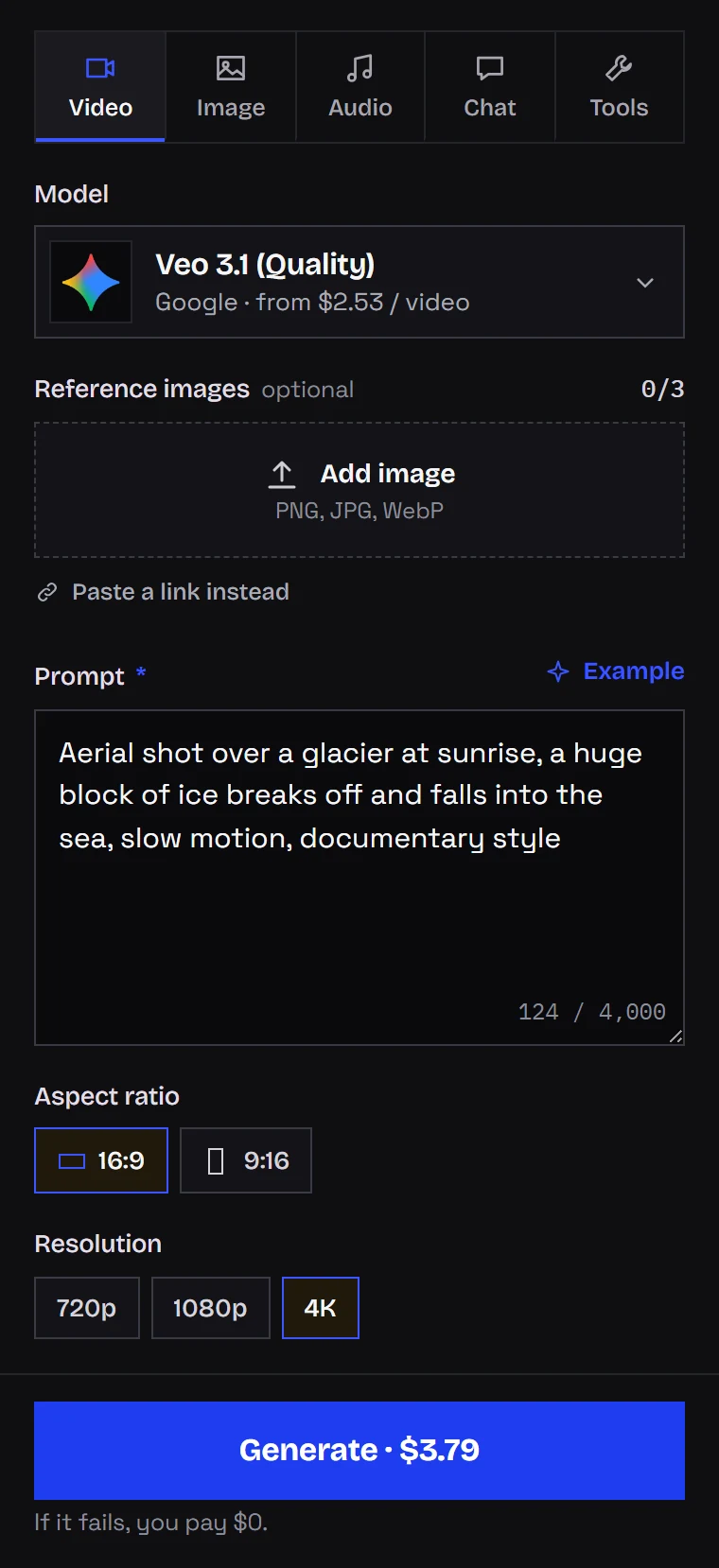
There is no length setting; Veo always returns 8 seconds.
From code
First, prices. The public catalog returns current rates for the three tiers with no key:
import requests

for model in ("veo-3.1", "veo-3.1-fast", "veo-3.1-lite"):
    m = requests.get(
        f"https://kadraris.com/v1/models/{model}", timeout=30
    ).json()
    prices = ", ".join(
        f"{v['resolution']}: ${float(v['amount']):.3f}"
        for v in m["pricing"]["variants"]
    )
    print(f"{m['name']:<20} {prices} per 8 s clip")
A vertical Fast clip that starts from your image:
curl https://kadraris.com/v1/generate \
  -H "Authorization: Bearer $KADRARIS_API_KEY" \
  -H "Content-Type: application/json" \
  -d '{
    "model": "veo-3.1-fast",
    "input": {
      "prompt": "Camera glides around a ceramic teapot on a wooden counter, steam curls up, morning light, quiet kitchen sounds",
      "aspect_ratio": "9:16",
      "resolution": "1080p",
      "image_urls": ["https://your-site.com/files/teapot.png"]
    }
  }'
A 4K Quality clip in Python, waiting for the file:
import os
import time
import requests

API = "https://kadraris.com/v1"
H = {"Authorization": f"Bearer {os.environ['KADRARIS_API_KEY']}"}

task = requests.post(f"{API}/generate", headers=H, json={
    "model": "veo-3.1",
    "input": {
        "prompt": ("Aerial shot along a desert canyon at dawn, "
                   "a hot air balloon rises over the rim, "
                   "documentary style"),
        "aspect_ratio": "16:9",
        "resolution": "4k",
    },
}).json()
print("estimate:", task["estimated_cost"])

while task["status"] in ("queued", "running"):
    time.sleep(10)
    task = requests.get(f"{API}/tasks/{task['id']}",
                        headers=H).json()

print(task["status"], task["cost"],
      [o["url"] for o in task["output"] or []])
Rules for the request:
- No
duration. It is fixed. - Public HTTPS images only.
- Lite takes text only: send
prompt,aspect_ratioandresolution, nothing else.
See the tasks docs for polling and webhooks, and the AI video API comparison for how Veo stacks up against Kling and Seedance.
Questions
Does 1080p cost extra over 720p?
No. Each tier has one price for both. Only 4K is more expensive.
Can I give Veo 3.1 Lite a reference photo?
No. Lite accepts text only and rejects images. For an opening frame or an appearance reference, use Fast or Quality, both of which take up to 3 images.
How do I make a 30-second video with Veo?
Generate several 8-second shots and join them in your editor. If you need one continuous take, Seedance 2.5 goes up to 30 seconds per generation.
Is there free Veo 3.1 access in Kadraris?
No. Kadraris starts at a $10 top-up, with no free allowance; money on the account never expires, and failed runs are not billed. Google Flow gives a small daily credit allowance inside its own app.