Your First AI Video, Start to Finish: From Shot List to MP4
How to make an AI video as a beginner: plan shots, pick a model, write the prompt, choose 9:16 or 16:9, length, resolution and sound, see the price, download.
 Piotr Olszewski2026-10-228 minPolski
An AI video is made one shot at a time. You describe a single shot in a prompt, choose a model and a few settings (frame shape, length, resolution, sound), check the price, and download the MP4 a minute or a few later. Repeat for each shot and edit them together. In Kadraris Studio the whole thing happens in a browser without code. Billing is per second of video, for example Seedance 2.5 costs from $0.261 per second, and a generation that fails costs nothing.
This guide takes you from an empty page to a short video built from several shots. If you already have a photo you want to animate, the image-to-video guide is the better starting point.
Before you open Studio: think in shots
The single most useful idea for beginners: a video model makes one shot per job. Depending on the model that is a few seconds up to 30. A short film is several such shots cut together, not one giant prompt.
So begin with a list:
- 3 to 6 shots,
- one sentence each,
- 5 to 10 seconds per shot.
A chat model is handy for this, and Studio has chat models on the same balance. You also need a browser (a computer is more comfortable than a phone) and a Kadraris account (sign up) topped up with at least $10.
Pick the model for the shot
Open the Video tab in Studio. No model wins at everything, so choose by what the shot needs:
- Long takes up to 30 s with sound, social clips: Seedance 2.5, from $0.261 per second.
- A character who talks, with lip sync: Kling 3.0, from $0.0963 per second.
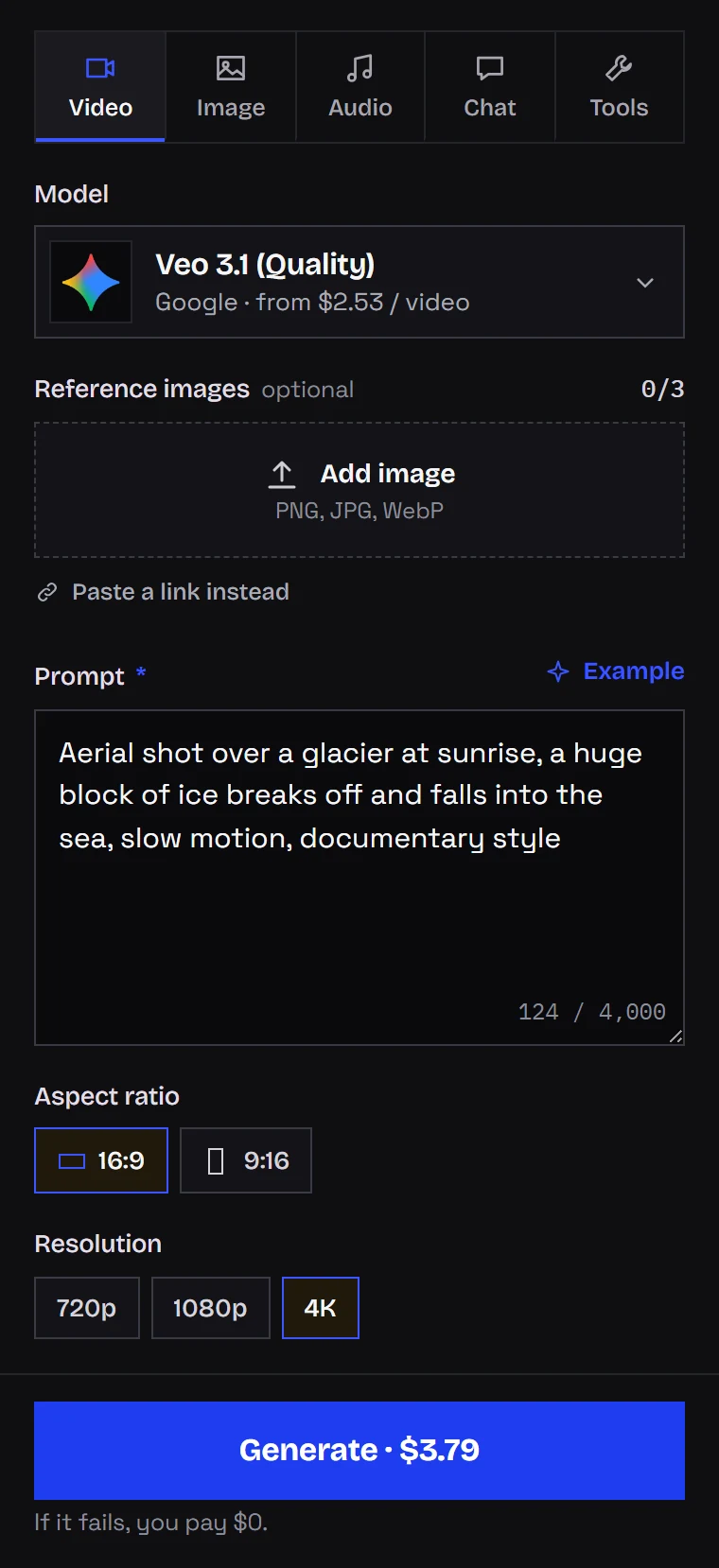
- A clean, polished 4K shot: Veo 3.1 (Quality), from $2.53 per video.
- 2K footage with stereo sound: MiniMax H3, from $0.161 per second.
- Long takes up to 30 s from 480p to 4K: Wan 3.0, from $0.0777 per second.
- Cheap drafts for testing prompts: Seedance 2.0 Mini at 480p, from $0.0784 per second, or Wan 3.0 at 480P for about the same rate.
For a closer look, read the AI video API comparison for 2026 or Seedance 2.0 vs 2.5. All video models are listed on the AI video generator page.
Write the prompt for that one shot
Keep the prompt to one shot. I build it from five pieces:
- Who or what, and how close: the subject and the framing.
- One action: a single thing that happens.
- The camera: push in, pull back, pan, handheld, or a static tripod shot.
- Light and mood: time of day, kind of light, atmosphere.
- Sound: what we hear, if audio is switched on.
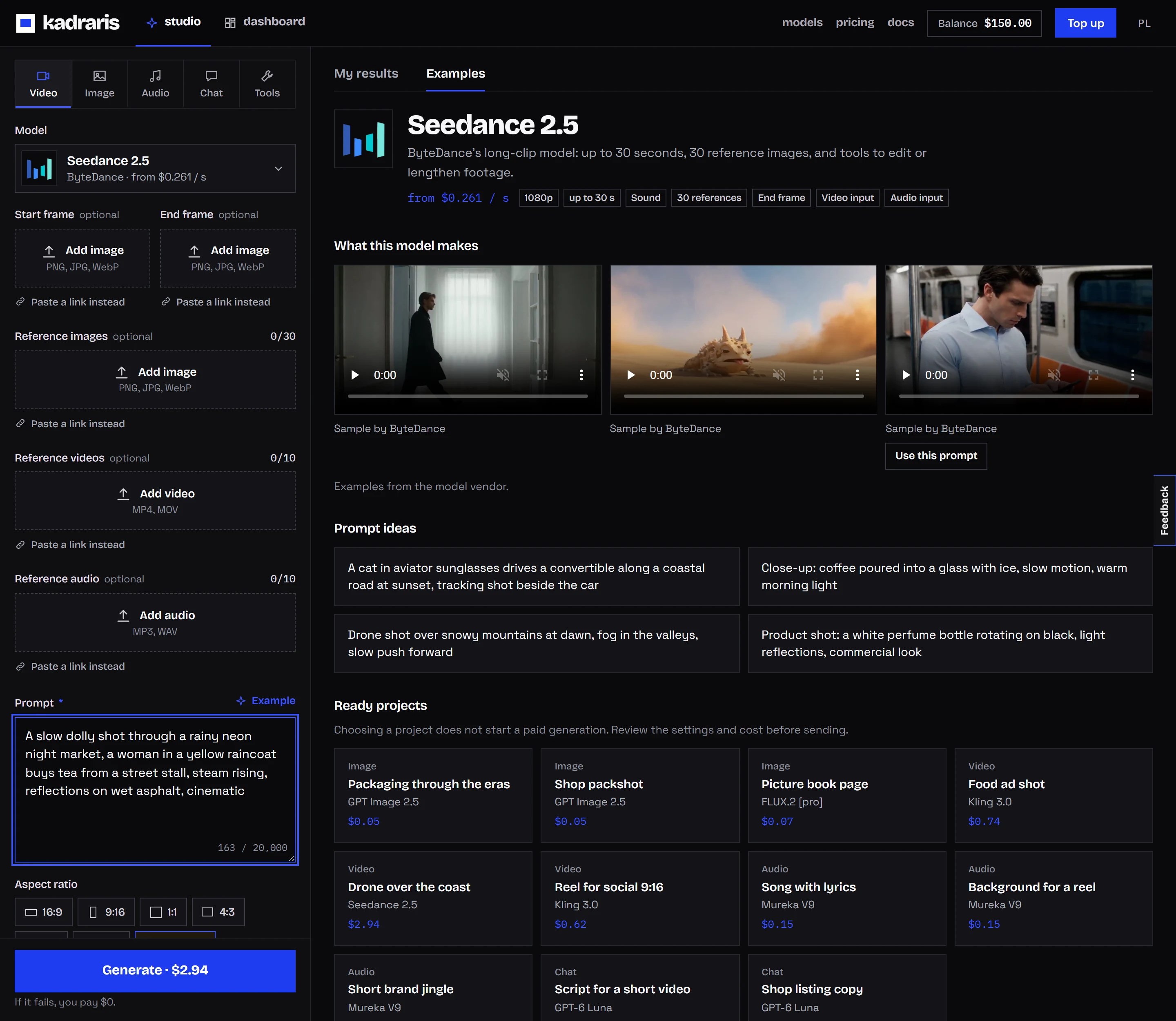
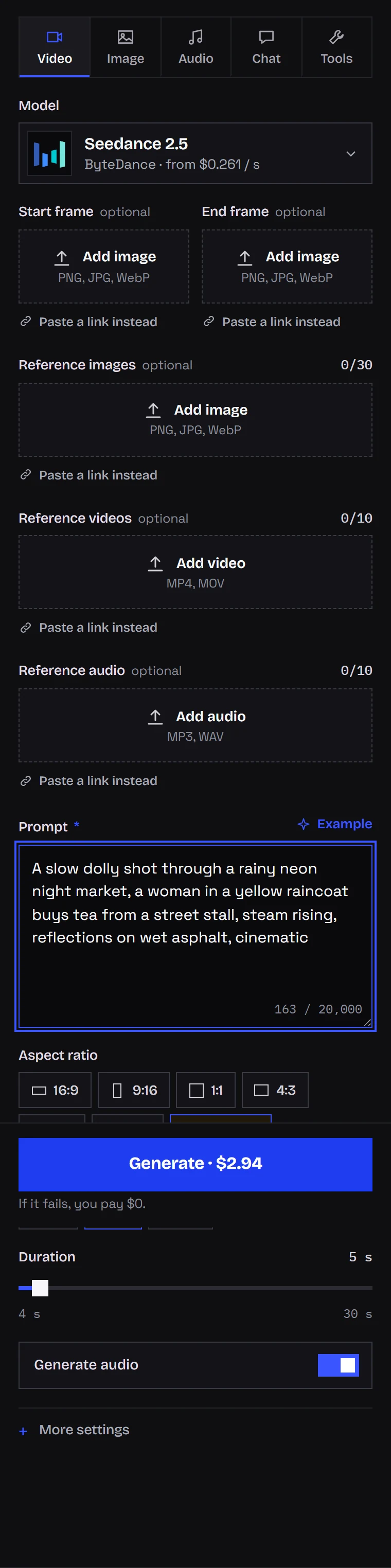
Here is the prompt used in the Seedance screenshot further down:
A slow dolly shot through a rainy neon night market, a woman in a yellow
raincoat buys tea from a street stall, steam rising, reflections on wet
asphalt, cinematic
More camera wording with templates: camera move prompts for AI video.
Frame shape: decide before you generate
Set the ratio for the place where the video will be posted. Turning a wide clip into a vertical one later means losing half the picture.
| Destination | Ratio |
|---|---|
| TikTok, Reels, Shorts | 9:16 |
| YouTube, websites, slides | 16:9 |
| Instagram or Facebook feed | 1:1, or 4:5 cut from 9:16 |
| cinematic opener with black bars | 21:9 |
Support differs per model. Veo 3.1 and Gemini Omni offer only 16:9 and 9:16. Kling 3.0 adds 1:1. Seedance, MiniMax H3 and Wan 3.0 have more choices, plus adaptive, which lets the model decide.
Alibaba's own vertical demo for Wan 3.0, with the product taken from a reference image:
Length: the setting that drives the bill
You pay per second, so duration matters more than anything else for cost. Maximum length of one clip:
- Seedance 2.5: 4 to 30 s
- Wan 3.0: 2 to 30 s
- Kling 3.0: 3 to 15 s
- MiniMax H3: 4 to 15 s
- Seedance 2.0: 4 to 15 s
- Veo 3.1: always 8 s
My habit: the first render uses the shortest length the model allows. When movement and framing are right, I render at the final length. A 15 to 30 second social video is usually 3 or 4 shots of 5 to 8 seconds, or one long Seedance 2.5 take.
ByteDance highlights 30-second single takes as the main feature of Seedance 2.5:
Resolution: low for tests, high for the keeper
- 480p: drafts and prompt checks.
- 720p: enough for clips watched on phones.
- 1080p: YouTube, ads, footage you will edit.
- 2K and 4K: large screens, cropping in post, final hero shots. Veo 3.1, Kling 3.0, Seedance 2.0 and Wan 3.0 go to 4K; MiniMax H3 delivers 2K.
On most models the per-second price rises with resolution. Get the prompt right cheaply, then render high once.
Sound: what to switch on and how to describe it
Many models now make audio together with the picture: effects, ambience, music, and on some models speech. Use the Generate audio switch, or generate_audio in the API. Seedance has it on by default, Kling has it off. MiniMax H3 produces a stereo track shaped by your prompt.
Describe sound as precisely as the image: "rain drumming on a tin roof", "faint traffic, no music". Put dialogue in quotes, and say who speaks and how. For narration, many people record their own voice or use a separate text-to-speech tool and add it during editing.
Price, balance and the Generate button
Studio calculates the cost of the exact job under the form before you send it: the per-second rate for the chosen resolution times the length. While the job runs, that amount is held on your balance. If the job fails, all of it comes back.
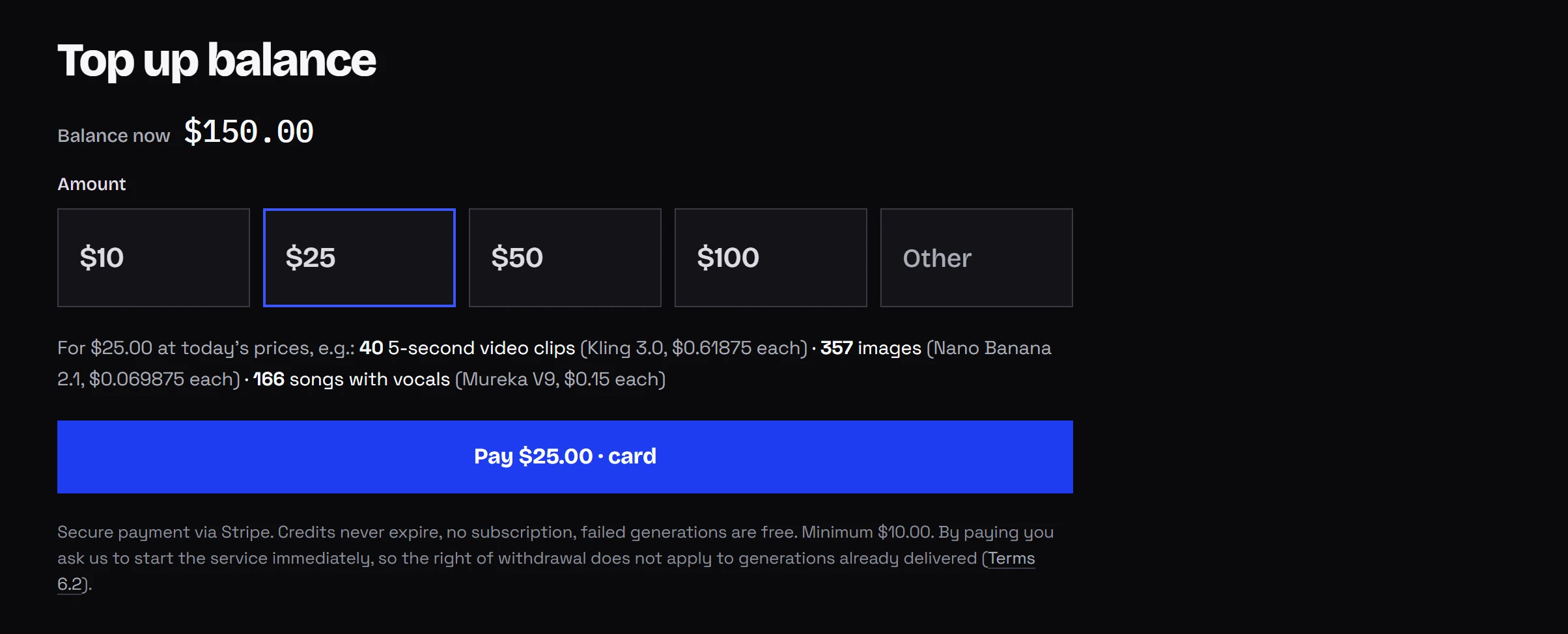
Add funds in the dashboard with a quick amount of $10, $25, $50 or $100, or type your own from $10. No subscription and no minimum commitment.
To estimate a whole video, add up every second you will render, retries included. Four 5-second shots with one retry each comes to around 40 seconds of the chosen model. Rates per resolution are on the pricing page, the cost calculator does the math for you, and AI video cost per second lines the models up.
Is there a free way?
Not on Kadraris: no free tier and no starter credit. You pay from the first generation, the minimum top-up is $10, the balance stays forever, and failures are free. Some model producers give trial or daily credits in their own apps, usually with limits like queues, lower resolution or a clip cap. Those terms change often, so check the producer's site. For one test clip that can be enough. Kadraris makes sense when you want several models on one balance, a visible price before each job, and an API on the same account.
Download and review the clip
One shot usually takes one to a few minutes. You can close the tab; the finished clip appears in your history. Download the MP4 as soon as it is ready. History stays in Studio, but file links expire after some time, and you want a local copy anyway.
My checklist for every clip:
- Does the camera move the way the prompt said?
- Do the face and clothes stay the same through the shot?
- Are hands and any text in the background intact?
- Does the sound match what is on screen?
If something is wrong, I change one detail in the prompt and run it again.
Putting several shots together
- Shot list: 3 to 6 shots, one sentence each, as above.
- A still for each shot: I generate an image per shot first. A still is far cheaper than seconds of video, so I settle the composition there.
- Animate each still: every still becomes the first frame of its clip. Since all shots start from images made in one session, the character looks alike across them.
- Music: a track from Mureka V9 ($0.15 per song) or licensed library music. The AI music generator page lists the audio models.
- Edit: combine shots, music and captions in CapCut, DaVinci Resolve or Premiere.
Step 3 in detail: image-to-video guide. A complete ad workflow: AI product ad workflow.
When you outgrow the browser
The same account and balance work from code:
curl https://kadraris.com/v1/generate \
  -H "Authorization: Bearer $KADRARIS_API_KEY" \
  -H "Content-Type: application/json" \
  -d '{
    "model": "seedance-2.5",
    "input": {
      "prompt": "A slow dolly shot through a rainy neon night market, a woman in a yellow raincoat buys tea from a street stall, steam rising, reflections on wet asphalt, cinematic",
      "duration": 5,
      "resolution": "720p",
      "aspect_ratio": "9:16",
      "generate_audio": true
    }
  }'
You get back a task id and estimated_cost. Fetch the file with GET /v1/tasks/{id} or receive it by webhook. A full Python example is in the Seedance 2.5 API guide.
Questions
Why can't I make a two-minute video in one go?
Each model caps a single clip, from a fixed 8 seconds on Veo 3.1 to 30 seconds on Seedance 2.5 and Wan 3.0. Longer videos are several clips edited together.
Which model should a beginner start with?
Seedance 2.5 is a comfortable first pick: long takes, sound on by default and many frame shapes. For cheap tests of your prompt, use Seedance 2.0 Mini or Wan 3.0 at 480p.
Do I have to keep the browser tab open while it renders?
No. Close it if you like. The finished clip shows up in your generation history.
Who owns the videos I make?
Output rights depend on each model producer's terms and on the service terms. Read them before client work, and do not use a real person's likeness without their consent.