Seedance 2.0 or 2.5? Seven Variants, One Decision
Seedance 2.0 vs 2.5 and their Fast, Mini and Eco versions - clip length, 4K, reference limits and per-second cost compared, with a pick for each kind of shot.
 Piotr Olszewski2026-10-229 minPolski
The short rule I use: Seedance 2.5 for anything longer than 15 seconds in one take, for heavy reference work, or for editing a video you already have. Seedance 2.0 for 4K, or when the bill matters more: base 2.0 is from $0.157 per second against from $0.261 per second for 2.5. Around those two sit five cheaper variants (Fast, Mini and the Eco tiers) that give up resolution to save money.
Below: what changed between versions, all seven in one table, how pricing behaves, my own test of one variant, and code to compare them.
Which one for which job
Start here if you just need an answer:
- One take over 15 seconds: Seedance 2.5. Fine with 720p or 1080p and a smaller bill? 2.5 Eco.
- 4K output: Seedance 2.0 or 2.0 Eco.
- Many references (people, product, voice) or changes to a finished clip: Seedance 2.5.
- Many cheap prompt drafts: 2.0 Mini at 480p, then render the final in the model you chose.
- Short 720p social posts with no plot to carry: 2.0 Fast or base 2.0.
- Budget 1080p, 15 seconds max: 2.0 Mini Eco, once a trial convinces you.
My own habit: work out the prompt on a 5-second clip in Mini or Fast, and only the polished text goes to 2.5 for the long render. A redo at 30 seconds on the 2.5 rate is expensive.
The two versions in brief
Seedance 2.0 came from ByteDance Seed in February 2026. Clips run 4 to 15 seconds, sound included, at anything from 480p to 4K. As input it takes a first and last frame and a reference set of 9 images, 3 videos and 3 audio files.
Seedance 2.5 was unveiled 23 June 2026 and became available 31 July 2026. The big difference is duration: a single generation can reach 30 seconds, with no stitched segments. The reference set grows to 30 images, 10 videos and 10 audio files, existing footage can be edited or continued, seed is supported, and Kadraris offers 480p, 720p and 1080p. 4K is not available.
This page is about choosing a version. For the 2.5 API in depth, with webhooks and error handling, see the Seedance 2.5 API guide.
Seven variants in one table
| Model | Length | Resolutions | Refs (img / video / audio) |
|---|---|---|---|
| Seedance 2.5 | 4-30 s | 480p, 720p, 1080p | 30 / 10 / 10 |
| Seedance 2.5 Eco | 4-30 s | 720p, 1080p | 30 / 10 / 10 |
| Seedance 2.0 | 4-15 s | 480p-4K | 9 / 3 / 3 |
| Seedance 2.0 Eco | 4-15 s | 720p, 1080p, 4K | 9 / 3 / 3 |
| Seedance 2.0 Fast | 4-15 s | 480p, 720p | 9 / 3 / 3 |
| Seedance 2.0 Mini | 4-15 s | 480p, 720p | 9 / 3 / 3 |
| Seedance 2.0 Mini Eco | 4-15 s | 720p, 1080p | 9 / 3 / 3 |
Per-second price at the cheapest resolution of each:
| Model | From | Sound by default |
|---|---|---|
| Seedance 2.5 | from $0.261 per second | on |
| Seedance 2.5 Eco | from $0.44 per second | on |
| Seedance 2.0 | from $0.157 per second | on |
| Seedance 2.0 Eco | from $0.248 per second | on |
| Seedance 2.0 Fast | from $0.124 per second | on |
| Seedance 2.0 Mini | from $0.0784 per second | off |
| Seedance 2.0 Mini Eco | from $0.0789 per second | on |
Aspect ratios are shared by all seven: 16:9, 9:16, 1:1, 4:3, 3:4, 21:9, and adaptive, which copies the input image. The request fields are the same too, so switching variant means editing the model value only.
How the pricing behaves
The tables hide a few patterns:
- Resolution is the biggest lever. In each variant, 720p costs over twice the 480p rate, and 1080p costs 1.7 to 2.5 times the 720p rate. On Seedance 2.0, a 4K second is around 5x a 720p second.
- 2.5 is pricier than 2.0 at the same resolution. At 720p, a second of 2.5 costs roughly 1.7 times a second of 2.0.
- Eco is a lower-priced tier of the same model. In Kadraris it takes the same parameters, with fewer resolutions and a lower rate. At 720p you save around 25% with 2.5 Eco. I have not compared Eco and base on one prompt yet, so I cannot promise identical results.
- Mini starts silent. Add
generate_audio: trueif you want sound.
Every clip costs its length times the rate for the chosen resolution. Typical cases I estimate:
| Clip | First variant I try | Formula |
|---|---|---|
| 5 s draft | 2.0 Mini, 480p | 5 seconds × Mini's 480p price |
| 15 s social, 720p | 2.0 Fast or 2.0 | 15 seconds × that 720p price |
| 10 s in 4K | 2.0 Eco or 2.0 | 10 seconds × that 4K price |
| 30 s one take | 2.5 Eco, 720p | 30 seconds × Eco's 720p price |
| 30 s at 1080p | 2.5 or 2.5 Eco | 30 seconds × that 1080p price |
Watch out for reference videos. Every second of footage you supply in video_urls is billed by ByteDance in addition to the generated seconds. The estimated_cost is based on output length only, while the final cost reflects real usage, so with reference clips the final number is higher. Reference images and audio are not billed.
Failed tasks are free: the reserved amount returns to you. Each model page and the pricing page list rates by resolution; other labs are compared in AI video cost per second.
Reasons to pay for 2.5
- Half a minute without cuts. Faces cannot drift between pieces when there are no pieces, and a mini story with a beginning and a punchline needs exactly that.
- A large reference set. 30 images, 10 clips and 10 audio tracks keep a cast, a product and a narrator consistent through one scene.
- Video editing. Replace a product, a style, the background or the lighting while the original motion and framing stay.
- Extension. The next shot picks up where the previous clip ended: same people, location and soundscape.
seed. Lets you repeat a result and change only the wording.
Reasons to stay on 2.0
- 4K. Available on 2.0 and 2.0 Eco. In Kadraris, 2.5 stops at 1080p.
- Lower rates. Resolution for resolution, 2.0 costs noticeably less, and Mini is a small fraction of the 2.5 rate.
- Room to iterate. Drafts on Fast or Mini, cheap 1080p on Mini Eco.
For shots of 15 seconds or less without a long narrative, 2.0 does the job. Here is ByteDance's image-to-video demo:
Need finer comparisons inside the 2.0 family? See Seedance 2.0 vs 2.0 Fast, Seedance 2.0 vs 2.0 Mini and 2.0 Mini vs 2.0 Fast.
What I saw testing 2.0 Fast
One variant I have run myself. On 27 September 2026, Seedance 2.0 Fast received the two test prompts I gave several other models that day (a coffee pour, and a Warsaw tram in yellow and red on a rainy evening). Settings: 4 seconds, 720p, sound on, a single attempt per prompt.
- Coffee, 8.0/10. Empty cup to full, a clear camera move inward, kitchen window in the background. Against it: a rainbow lens flare and music nobody asked for.
- Tram, 7.0/10. Locked camera, the vehicle passes edge to edge and the wet stones are convincing. However, the tram is cream with red, and umbrellas appear only far back.
- Render time: 106 to 164 seconds per clip, well behind Veo on the same day.


Lesson: Seedance tends to add music. To avoid that, spell out the soundtrack ("only rain and street noise, no music") or disable audio and lay sound in during editing. For speech, ByteDance names 11 supported languages for Seedance 2.5, English, Spanish, Portuguese, Japanese and Korean among them.
Choosing a variant in Studio
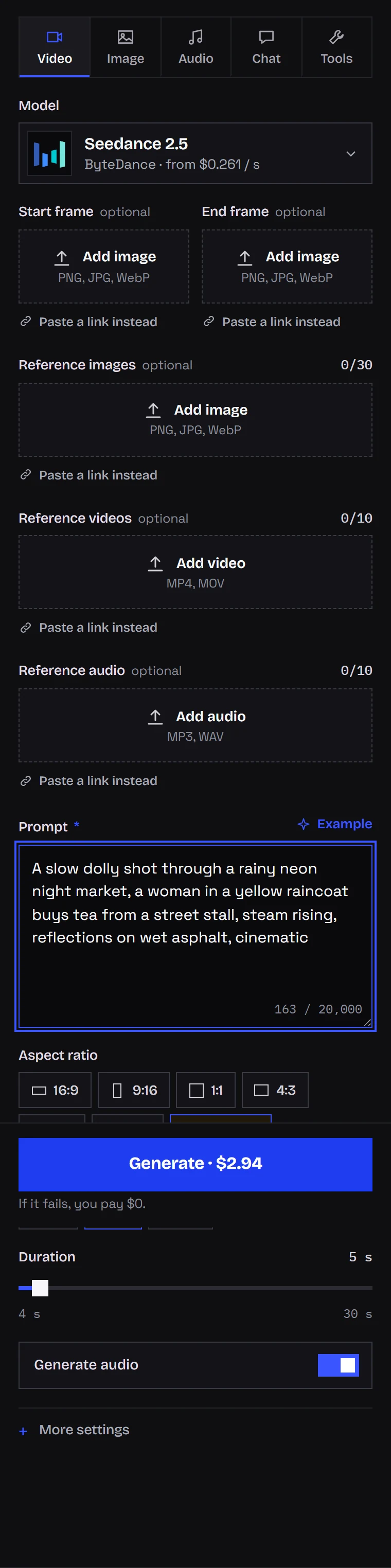
In Kadraris Studio, the form changes with the variant you select: allowed resolutions, duration range and reference slots all update. The screenshot shows Seedance 2.5 with a 4-30 s range, three resolutions, slots for 30 images, 10 videos and 10 audio files, and the price before you click "Generate".
To animate your own photos, follow the image-to-video guide.
Comparing variants from code
The catalog is public, so this script needs no key. It prints duration limits and per-resolution rates for every variant:
import requests

MODELS = [
    "seedance-2.5", "seedance-2.5-eco",
    "seedance-2.0", "seedance-2.0-eco",
    "seedance-2.0-fast", "seedance-2.0-mini",
    "seedance-2.0-mini-eco",
]

for model in MODELS:
    m = requests.get(
        f"https://kadraris.com/v1/models/{model}", timeout=30
    ).json()
    rates = ", ".join(
        f"{v['resolution']}: ${float(v['amount']):.3f}/s"
        for v in m["pricing"]["variants"]
    )
    dur = m["input_schema"]["properties"]["duration"]
    print(f"{m['name']:<22} "
          f"{dur['minimum']}-{dur['maximum']} s  {rates}")
To compare output, send one prompt to two variants. The estimate is returned at once:
import os
import requests

API = "https://kadraris.com/v1"
H = {"Authorization": f"Bearer {os.environ['KADRARIS_API_KEY']}"}
PROMPT = ("An old man feeds pigeons in an empty square at "
          "dawn, slow dolly left, only birds and wind, no music")

for model in ("seedance-2.0-fast", "seedance-2.5"):
    task = requests.post(f"{API}/generate", headers=H, json={
        "model": model,
        "input": {"prompt": PROMPT, "duration": 5,
                  "resolution": "720p", "aspect_ratio": "9:16",
                  "generate_audio": True},
    }).json()
    print(model, task["id"], task["estimated_cost"])
Pick up the results with GET /v1/tasks/{id} or a webhook, as the tasks docs explain. For Seedance against Kling and Veo, read the AI video API comparison.
Questions
Can I move a prompt from 2.0 to 2.5 without changes?
Yes. All variants share the request fields and aspect ratios. Change model, and check that your resolution is on the new variant's list, since 2.5 has no 4K.
Why did my final cost come out above the estimate?
Most likely you passed reference videos. Their seconds are billed on top of the output, and estimated_cost counts only the output length.
Is 2.5 Eco just a lower-quality 2.5?
It is a cheaper tier of the same model with the same parameters and a shorter resolution list (720p and 1080p). I have not put Eco and base side by side on one prompt, so I do not claim the output is identical.
How do I stop Seedance from adding music?
Write the soundscape into the prompt, for example "only wind and footsteps, no music", or set generate_audio to false.