What Kling 3.0 Really Costs: Per-Second Rates, Audio, Turbo and Motion Control
Kling 3.0 API pricing: rate per second at 720p, 1080p and 4K, cost of 5 to 15 s clips, what audio adds, and how Turbo and Motion Control are billed.
 Piotr Olszewski2026-10-228 minPolski
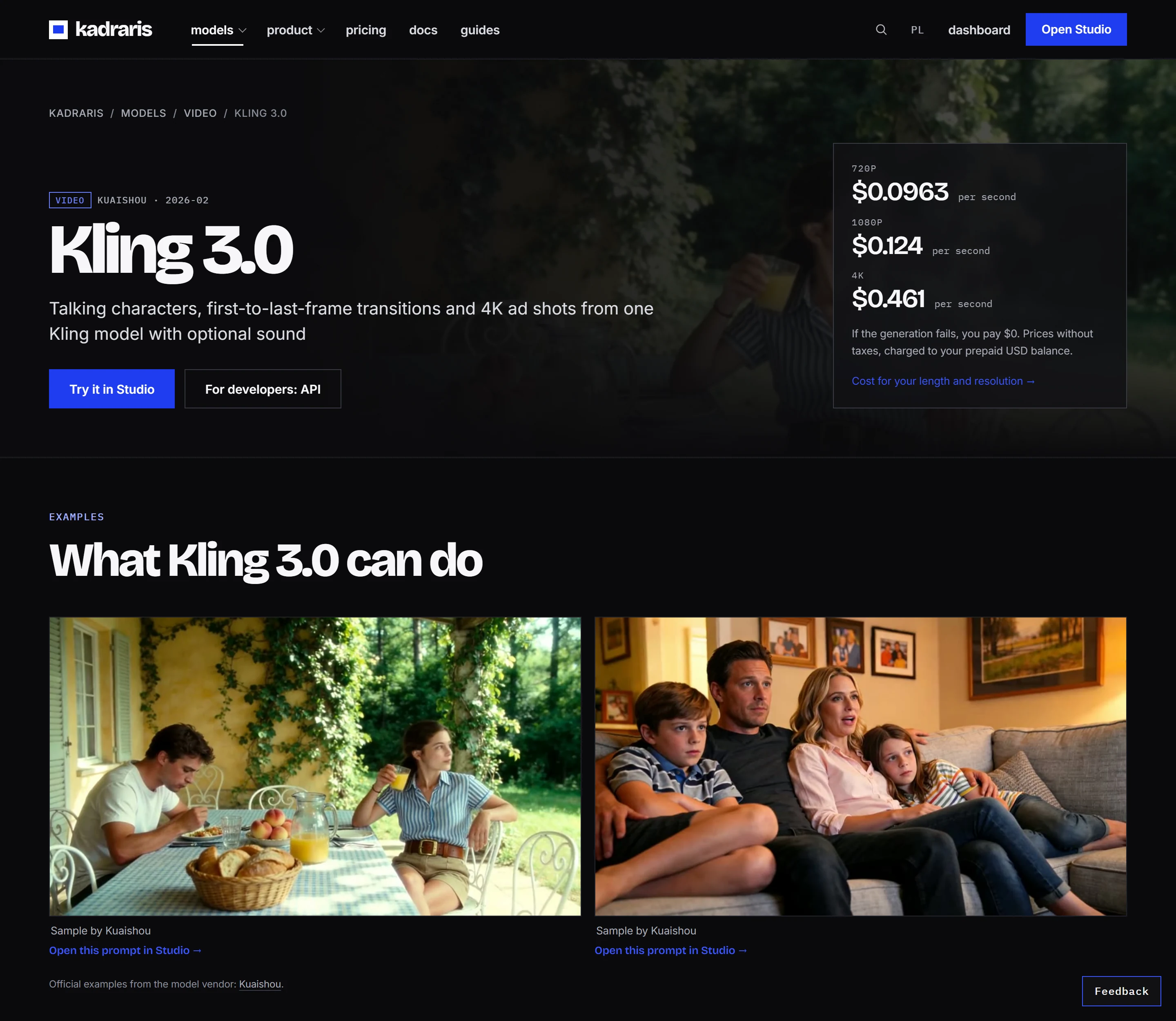
On Kadraris, Kling 3.0 costs from $0.0963 per second, and the bill covers just the video seconds that actually get delivered. No subscription, no monthly credit pool that runs out. That starting rate is the 720p tier. Going to 1080p adds roughly a third per second; 4K is nearly fivefold the base tier.
This guide covers the things that set the price, typical clip costs, the sibling models (Turbo and Motion Control), what my own test showed, and the API calls.
Four things that set the price
Kling 3.0 is Kuaishou's video model from February 2026. Billing is per second of output.
1. Resolution. This is the main lever. In Kuaishou's app the levels are called Standard, Pro and 4K. Over the API you set the level through resolution:
720p(Standard, "std"): the lowest rate, from $0.0963 per second.1080p(Pro, the default): roughly 1.3 times the 720p rate.4k: roughly 4.8 times the 720p rate.
You will find the precise figure per tier on the Kling 3.0 model page and in pricing; global prices are USD, taxes excluded.
2. Length. A clip runs 3 to 15 seconds, 6 by default. The cost is the rate times the seconds, nothing on top.
3. Audio. With generate_audio: true, Kling 3.0 produces speech with lip sync plus ambient sound. Kuaishou charges extra for sound at 720p and 1080p, which lifts each second to about 1.4 to 1.5 times the silent rate; at 4K the rate stays the same. Studio and estimated_cost include this as soon as you turn audio on. If music or narration will be added in the edit anyway, keep audio off.
4. Failures. When the status is failed, you pay $0 and the reserved amount goes straight back. A clip that renders but disappoints you is a success and is charged.
Typical clips and their cost
Since billing is linear, every clip is simple math:
| Clip | Billed as | Typical use |
|---|---|---|
| 5 s, 720p | 5 × 720p rate | testing a prompt or camera move |
| 5 s, 1080p | 5 × 1080p rate | B-roll, a social cutaway |
| 10 s, 1080p | 10 × 1080p rate | a dialogue scene, a product shot |
| 15 s, 1080p | 15 × 1080p rate | a whole short in one task |
| 15 s, 4K | 15 × 4K rate | the hero shot of a campaign |
Studio shows the total before you press Generate. Over the API, the same figure arrives as estimated_cost when you submit.
How I keep it under control: I refine the prompt on 5 seconds at 720p, and render only the final take at full length in 1080p or 4K. Iterating directly in 4K costs almost five times as much per attempt. For budgeting a whole ad test, see planning Kling 3.0 ad variants, and for estimates try the cost calculator.
The siblings: Turbo and Motion Control
| Model | Job | Billed per | Price |
|---|---|---|---|
| Kling 3.0 | prompt or still, 3 to 15 s, 4K max, sound | output second | from $0.0963 per second |
| Kling 3.0 Turbo | quicker 720p or 1080p clips, silent | output second | from $0.277 per second |
| Kling 3.0 Motion Control | your video's motion applied to a character photo | second of source video | $0.249 per second |
| Kling 2.6 Motion Control | the same, lower tier | second of source video | $0.138 per second |
What the names leave out:
- Turbo costs more, not less. Its current rate per second is higher than base Kling 3.0 in 720p. The extra buys speed while you lose audio, 4K and the end frame (start frame only). I pick it when delivery time beats features. Head to head: Kling 3.0 vs Kling 3.0 Turbo.
- Motion Control charges for the input clip, not the result. Kadraris uses the photo to decide which way the character faces, which limits the motion clip to 3 to 10 seconds (the longer 3 to 30 s mode where orientation follows the video is not available here yet).
proquality costs more thanstd, and the final amount appears incostwhen the task ends. - Motion Control 3.0 holds faces better than 2.6, as the producer samples below show. 2.6 is enough for choreography tests and simple mascots.
- Kling 4.0 got its announcement from Kuaishou on 28 September 2026; as I write, Kadraris does not list it yet.
Settings and strengths
What Kling 3.0 accepts on Kadraris:
- clips of 3 to 15 seconds,
- 16:9, 9:16 or 1:1 (when you attach a still, its own shape is used),
- 720p, 1080p or 4K,
- a start frame in
image_urland an end frame inend_image_urlfor a planned transition, - up to 2 reference images in
image_urls, - optional audio with speech, lip sync and ambience,
- prompts of up to 2,500 characters.
For speech, Kuaishou names five languages in 3.0: English, Chinese, Spanish, Japanese and Korean. People are where the model does best, whether that means a multi-shot sequence inside a single prompt or characters having a conversation. Two producer samples show that well.
My test: sharp, but loose with the prompt
For my ranking on 27 September 2026, the standard Kling 3.0 received the same two prompts as the other video models. One showed coffee filling a cup; the other a rainy Warsaw street at dusk with a tram painted yellow and red. Both clips were crisp at 1080p. Following the prompt was the weak spot. In 4 seconds the coffee hardly rose in the cup. The tram came out cream rather than yellow, and the light looked like a grey afternoon, not dusk. My scores: 7.0 and 6.5 out of 10.


Two shots do not settle anything, but I now repeat the colors and the hour in every Kling prompt.
Per second versus a monthly plan
Kuaishou's app sells Kling as monthly plans with a pool of credits. Kadraris instead deducts each second from a prepaid balance with no expiry. Which model of paying fits which kind of work is covered in using Kling AI without a subscription. Rates across other video models: AI video cost per second.
Generating in Studio
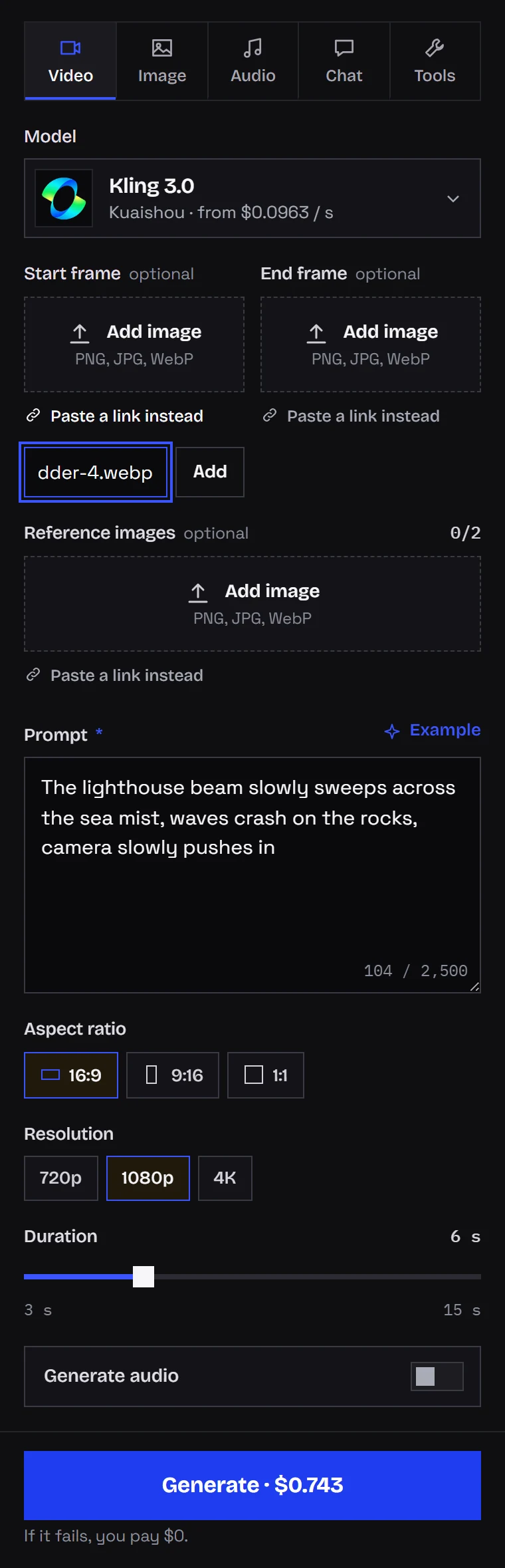
- Open Kadraris Studio and choose Kling 3.0.
- Write the prompt: setting, action, camera. Spoken lines go in quotes.
- Choose the frame shape, resolution and a length from 3 to 15 seconds.
- Tick "Generate audio" for speech or ambience.
- Optionally paste or upload a start frame. The end frame and the 2 reference images are in the folded fields below.
- Check the price and click "Generate".
Clips stay in your history. Everything about animating stills is in my guide to image-to-video.
API calls
After signing up, make a key (sk-kd-...) in the dashboard. Every field is described in the generate docs.
curl https://kadraris.com/v1/generate \
  -H "Authorization: Bearer $KADRARIS_API_KEY" \
  -H "Content-Type: application/json" \
  -d '{
    "model": "kling-3.0",
    "input": {
      "prompt": "Slow push-in on a lighthouse at night, the beam sweeps through thick fog, waves crash on the rocks",
      "image_url": "https://your-site.com/files/lighthouse.png",
      "duration": 5,
      "resolution": "720p",
      "generate_audio": false
    }
  }'
The 202 response includes the task id and estimated_cost. A Python version with a speaking scene and polling:
import os, time, requests

API = "https://kadraris.com/v1"
H = {"Authorization":
     f"Bearer {os.environ['KADRARIS_API_KEY']}"}

line = "I knew you'd come back."
task = requests.post(f"{API}/generate", headers=H, json={
    "model": "kling-3.0",
    "input": {
        "prompt": "A woman at a cafe table looks up "
                  f"and says \"{line}\" Soft window "
                  "light, handheld",
        "duration": 10,
        "resolution": "1080p",
        "aspect_ratio": "9:16",
        "generate_audio": True,
    },
}).json()
print("estimate:", task["estimated_cost"])

# check every 10 s until it finishes
while task["status"] in ("queued", "running"):
    time.sleep(10)
    task = requests.get(f"{API}/tasks/{task['id']}",
                        headers=H).json()

urls = [o["url"] for o in task["output"] or []]
print(task["status"], task["cost"], urls)
Variations:
- Transition between two frames: add
end_image_url. - Motion Control: use the
kling-3.0-motion-controlid, send the clip with the movement asvideo_urland the character asimage_url, and choosestdorproforquality. - Schema and live prices:
GET /v1/models/kling-3.0, public, no key needed. - Many tasks at once: use webhooks instead of polling.
Kling next to Veo, Seedance and the rest, by duration, resolution and cost: AI video API comparison, or directly Kling 3.0 vs Veo 3.1.
Questions
Does turning on audio change the price of a Kling clip?
At 720p and 1080p, yes. With generate_audio on, the per-second rate there is about 1.4 to 1.5 times higher; the 4K rate does not change. Studio and estimated_cost show the higher figure as soon as audio is enabled.
Which resolution should I test prompts at?
720p. It is the cheapest tier and good enough to judge motion and framing. Move to 1080p or 4K for the take you keep.
Why was I charged for a clip I did not like?
Because it rendered successfully. Only tasks that end as failed are free, and for those the full hold returns to your balance.
Is Kling 3.0 Motion Control charged for the output length?
No. What counts is the length of the motion clip you send in, between 3 and 10 seconds on Kadraris.