Logo Drafts With AI - Getting the Name Spelled Right
Draft a logo with AI: the image models that get brand lettering right, a designer-style prompt, turning PNG into vector, session cost and ownership basics.
 Piotr Olszewski2026-10-228 minPolski
The hard part of an AI logo is not the symbol. It is the name. A model that writes "Nortline" instead of "Northline" ruins a good design, and a missing letter is easy to overlook at thumbnail size. In my lettering tests GPT Image 2.5 ($0.05 per image) and Nano Banana Pro (from $0.07 per image) spelled text without errors, while Seedream 5.0 Pro drew the most attractive letters but now and then added accents nobody asked for. Whichever you choose, you get pixels, not an SVG, so plan a vector step at the end.
Below you will find the model shortlist, a prompt to adapt, the five steps I follow, the vector conversion, the price of a typical drafting round and a short note on ownership.
Five steps from name to finished mark
- Fix the exact name. Capital letters, spaces, symbols, all as they must appear. Add one line describing the business.
- Explore the symbol without text. Ask an inexpensive model like Z-Image for twelve or more icon ideas. At this stage you want a shape, not lettering.
- Combine symbol and name. Describe the winning icon, add the brand in quotes and render with GPT Image 2.5. Four to six runs is normal for me.
- Refine at high resolution. Feed the strongest draft into Nano Banana Pro as a reference, set 2K or 4K, and spell out what has to stay untouched.
- Convert to vector. Trace or redraw the PNG, then check how it reads at 32 px.
Model choice: who spells your brand correctly
For a wordmark, typography is everything. I judge models by tests I ran for my Polish blog. Each model got one try at three jobs (a storefront, a poster, a neon), and the text included Polish characters such as Ż, Ó, Ł and Ć, which trip weaker models quickly.
| Model | Lettering result | Best logo use | Price |
|---|---|---|---|
| GPT Image 2.5 | correct at every quality level | wordmarks, quick variations | $0.05 per image |
| Nano Banana Pro | storefront and 4-line poster right | high-res final | from $0.07 per image |
| Seedream 5.0 Pro | once right, once with extra accents | decorative type, proofread it | from $0.0783 per image |
| Z-Image Turbo | English fine, accents wrong | symbol sketches with no text | $0.02 per image |
Sizes on Kadraris: GPT Image 2.5 returns 1024x1024, 1536x1024 or 1024x1536; Nano Banana Pro offers 10 aspect ratios from 1K to 4K; Seedream 5.0 Pro has 8 ratios at 1K to 2K; Z-Image has 5 ratios. "From" prices refer to the lowest resolution. Ideogram, common in logo tool roundups, is not in the Kadraris catalog.
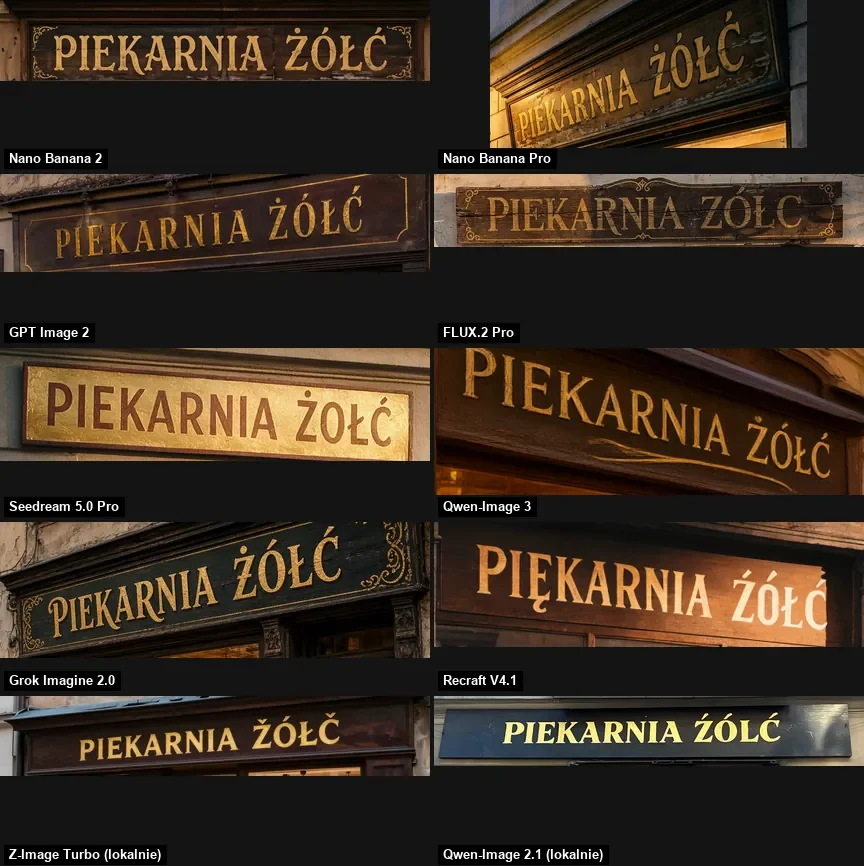
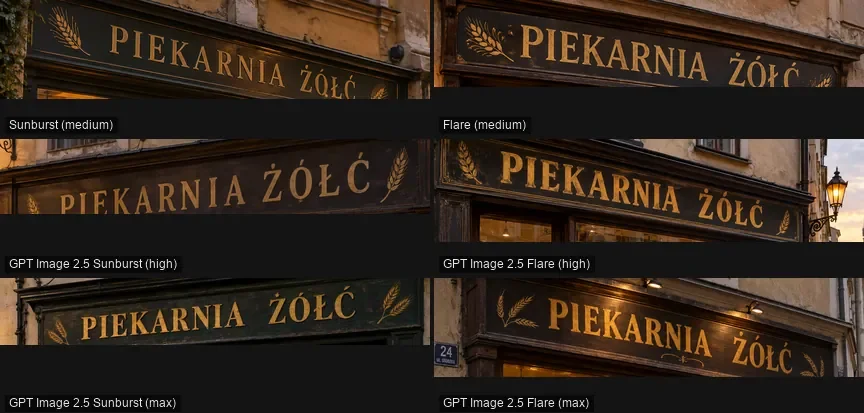
On lettering, GPT Image 2.5 never slipped. I rendered a bakery storefront at six quality levels and every one was spelled right:
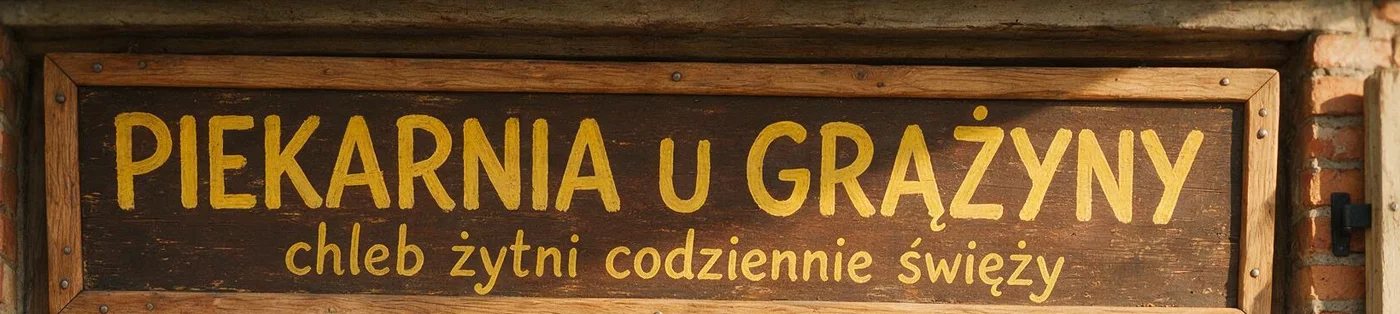
Seedream 5.0 Pro drew the nicest letters, yet it also put diacritics on letters that should have none. In a logo that kind of mistake can go unnoticed until print:
For more on lettering, read AI text in images. Three models side by side: GPT Image 2.5 vs Nano Banana Pro vs FLUX.2.
Limits to accept before you start
An image model is not a design tool. It paints a logo the same way it paints a landscape, from a description, pixel by pixel. That has three effects:
- The output is pixels. GPT Image 2.5 gives 1024 px squares, Nano Banana Pro goes to 4K. That covers an avatar or a web banner, not a vehicle wrap or a large sign.
- No transparency. There is no transparent-background switch in the Kadraris forms. I ask for plain white and remove it later.
- Letters are shapes. The model draws text like any other object, so proofread every letter. Keep it to the brand name; a slogan doubles the chance of a typo.
What AI is good at is breadth. In a quarter of an hour you can see dozens of directions for symbol, type and color, then refine one by hand.
The prompt: write it like a designer brief
State the kind of mark, the name in quotes, the typeface in plain words, the colors and the background. Words like "flat", "vector style" and "no mockup" stop the model from staging the logo on stationery or a storefront.
Flat vector-style logo for a small coffee roastery, centered on a plain white background, no mockup.
Wordmark text exactly "Northline Roasters" and nothing else.
Symbol: a simple coffee bean split by a single horizon line, single line weight.
Font: bold geometric sans-serif, all caps, charcoal #222222, symbol in amber #E8A33D.
Two colors only, no gradients, no shadows, generous margins.
Color codes are a hint, not a rule, yet they keep runs closer to each other.
Running it in Kadraris Studio
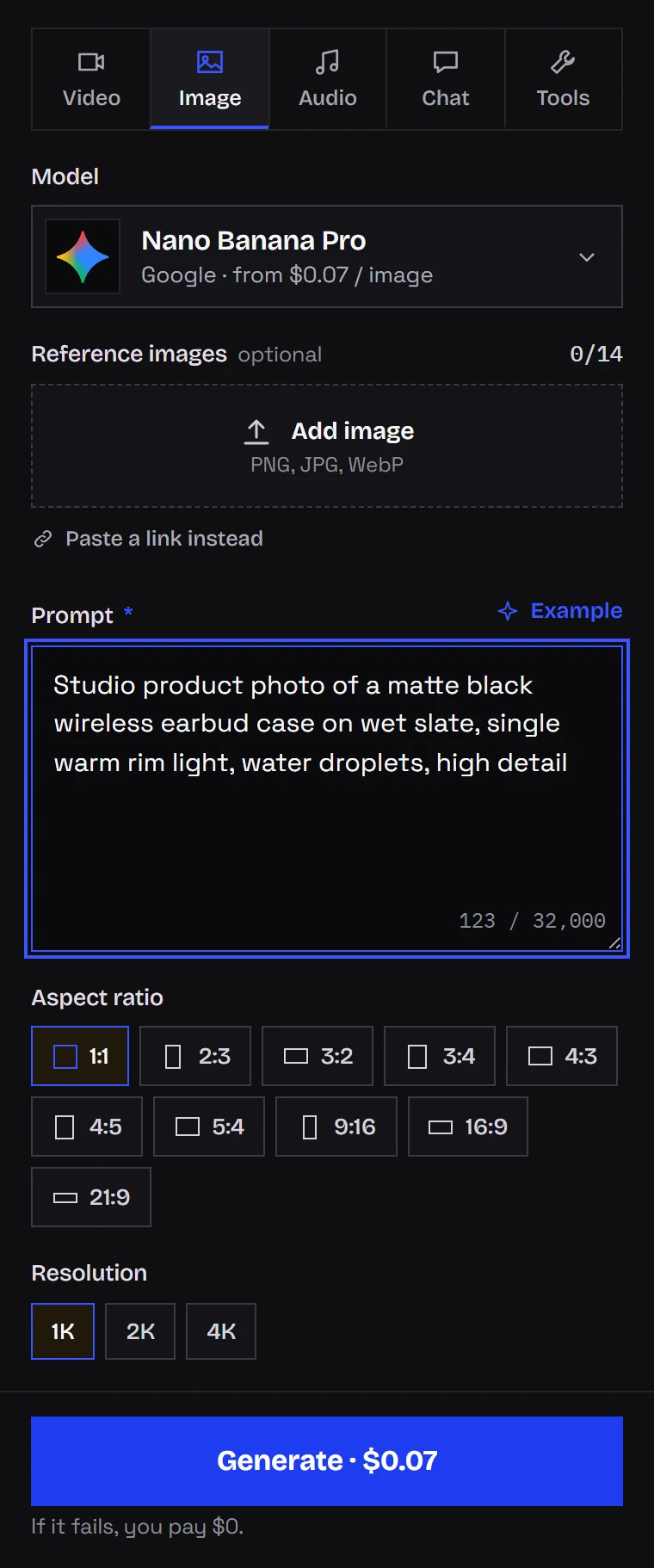
Open Kadraris Studio, choose the Image tab, pick a model, set 1:1 and paste the prompt. The price is visible before you press Generate. With Nano Banana Pro you also get 1K/2K/4K buttons and a slot for reference images, which is where your favorite draft goes for the next pass.
Running it through the API
Same prompt, with the request waiting for the image:
curl "https://kadraris.com/v1/generate?wait=60" \
  -H "Authorization: Bearer $KADRARIS_API_KEY" \
  -H "Content-Type: application/json" \
  -d '{
    "model": "gpt-image-2.5",
    "input": {
      "prompt": "Flat vector-style logo for a small coffee roastery, centered on a plain white background, no mockup. Wordmark text exactly \"Northline Roasters\" and nothing else. Symbol: a coffee bean split by a horizon line. Two colors only, no gradients.",
      "aspect_ratio": "1024x1024",
      "quality": "high"
    }
  }'
GPT Image 2.5 expects pixel sizes in aspect_ratio: 1024x1024, 1536x1024, 1024x1536 or auto. To refine in Nano Banana Pro, put the link to your pick in image_urls and write a narrow instruction, for example: "do not alter the lettering or the icon; recolor #222222 to #1B2A41". The full field list is in the generation docs.
From PNG to vector
None of the image models on Kadraris output SVG. You have three options:
- Automatic tracing. Illustrator (Image Trace) or the free Inkscape (Trace Bitmap). Tracing handles flat two-tone art on white best, and that is the reason the prompt requests it.
- Redraw it. You or a designer rebuild the mark with clean curves. This gives the best file and adds real human authorship, which helps on the rights side.
- Type the name yourself. Use the AI icon only and pair it with a licensed font of similar character. The letters are then guaranteed correct.
Then test the vector at three sizes: a 32 px favicon, a website header and a poster. Anything that disappears at 32 px should go.
Budget for one logo session
Kadraris charges per image from prepaid funds. Top-ups start at $10, nothing renews monthly, there is no free tier, and unused money stays in the account. One realistic round:
| Stage | Model | Images | Cost |
|---|---|---|---|
| Symbol sketches | Z-Image | 20 | 20 × $0.02 per image |
| Name variations | GPT Image 2.5 | 6 | 6 × $0.05 per image |
| Final at high resolution | Nano Banana Pro | 2 | 2 × from $0.07 per image |
Total: 28 images, or 20 × $0.02 per image + 6 × $0.05 per image + 2 × from $0.07 per image (a 4K render on Nano Banana Pro is slightly higher). Runs that fail are not billed. Every rate is listed on the pricing page; for putting the mark on packshots, read AI product photos.
Ownership and trademarks
This is background, not legal advice. If the brand is important, a trademark attorney is worth the fee.
- Copyright protects human creative work. According to the US Copyright Office, purely machine-made material is not registrable, and many other jurisdictions are similar or undecided. Hand work on the final mark (redrawing, editing, arranging) strengthens your claim.
- Trademark works separately. Offices like USPTO, EUIPO or UKIPO register marks after checking whether yours stands out and does not clash with older ones.
- Look-alikes. Models were trained on huge numbers of logos. Search databases like TMview or USPTO before using a mark, and never prompt for something "in the style of" an existing brand.
- Model terms. The model's maker defines how outputs may be used. Your prompts and images are never used by Kadraris for training.
Questions
Can I get a logo with a transparent background directly?
No, the forms on Kadraris have no transparency option. Generate on plain white and remove the background in an editor, or let the vector tracing step drop it.
Should I use AI for the whole logo or only the symbol?
For a business you plan to grow, my choice is the AI icon plus a properly licensed font for the name. You avoid letter errors entirely, and the result is easier to defend as your own work.
What should I check before I print the logo?
Read the name letter by letter at full zoom, view the mark at 32 px, and search trademark databases for similar logos in your industry. A typo found after printing costs far more than a few extra drafts.
Why do my colors drift between attempts?
Image models treat color words loosely. Adding HEX codes and limiting the palette to two or three colors keeps attempts closer. For an exact brand color, fix it during vectorizing.