Z-Image Turbo: Very Cheap, Very Fast Images and Where It Falls Short
Using the Z-Image Turbo API - flat per-image cost, about four seconds a picture on my RTX 4090, test results good and bad, plus curl, Python and JS code.
 Piotr Olszewski2026-10-228 minPolski
Need hundreds of blog illustrations, background plates or quick composition sketches, and the price per image matters more than perfection? That is the job for Z-Image Turbo. Alibaba's Tongyi group published it with open weights as a prompt-to-picture model, and in Kadraris it costs $0.02 per image, the lowest per-image price in the image catalog when I wrote this. On my own RTX 4090 it produced a 1344x768 image in 4 to 4.5 seconds at 9 steps. Short English text comes out well; accented letters do not.
This guide covers the price, the speed I measured, test images, weak spots, when to use it, how it differs from Z-Image Pro, code in three languages, and local versus API use.
Price per image
Every image is $0.02 per image. Aspect ratio and prompt length do not change that. For comparison, some other image models in the same catalog:
| Model | Price |
|---|---|
| Z-Image Turbo | $0.02 per image |
| Z-Image Pro | $0.05 per image |
| GPT Image 2.5 | $0.05 per image |
| FLUX.2 [pro] | from $0.0688 per image |
| Nano Banana Pro | from $0.07 per image |
The usual Kadraris rules apply:
- Cost before sending:
estimated_costin the API, the price on the button in Studio. - Failed generations are free.
- No subscription, a balance that does not expire, top-ups from $10.
What you can and cannot set
Tongyi-MAI, part of Alibaba, launched the Z-Image line in November 2025. Turbo is distilled, so a handful of denoising steps replaces the usual dozens; that is the source of its speed. Size: roughly 6B parameters. License: Apache 2.0, commercial use allowed.
Call it as z-image. There is not much to configure:
| Setting | In Kadraris |
|---|---|
| Input | a prompt; pictures are not accepted |
aspect_ratio | 1:1, 4:3, 3:4, 16:9, 9:16 (1:1 if omitted) |
| Output count | one picture per call |
| Prompt | max 1,000 characters |
| Resolution | follows the aspect ratio; not selectable |
| Seed | none; each result is random |
| Text in the image | English and Chinese, per the maker |
Live price and details: Z-Image Turbo.
Speed I measured
These figures are from my local setup: ComfyUI, an RTX 4090 with 24 GB, bf16 weights, 9 steps.
| Run | Size | Time |
|---|---|---|
| cold start incl. load | 1344x768 | 478.7 s |
| run 2 | 1344x768 | 7.5 s |
| runs 3+, wide | 1344x768 | 4.5 s |
| 1:1 | 1024x1024 | 4.0-4.5 s |
| tall | 768x1344 | 4.0 s |
Almost eight minutes for the first image sounds bad, yet most of it was the weights being copied off the drive into VRAM. That happens once; on an idle NVMe drive it normally takes tens of seconds. From then on it was about four seconds per image.
Through the API, what you wait for is the queue and how busy the servers are, not my card, so I make no four-second promise there. For images you can add ?wait=60, and the server keeps the request open until the image is ready.
Test images: the good parts
Every image below is mine, generated locally with this model from English prompts.
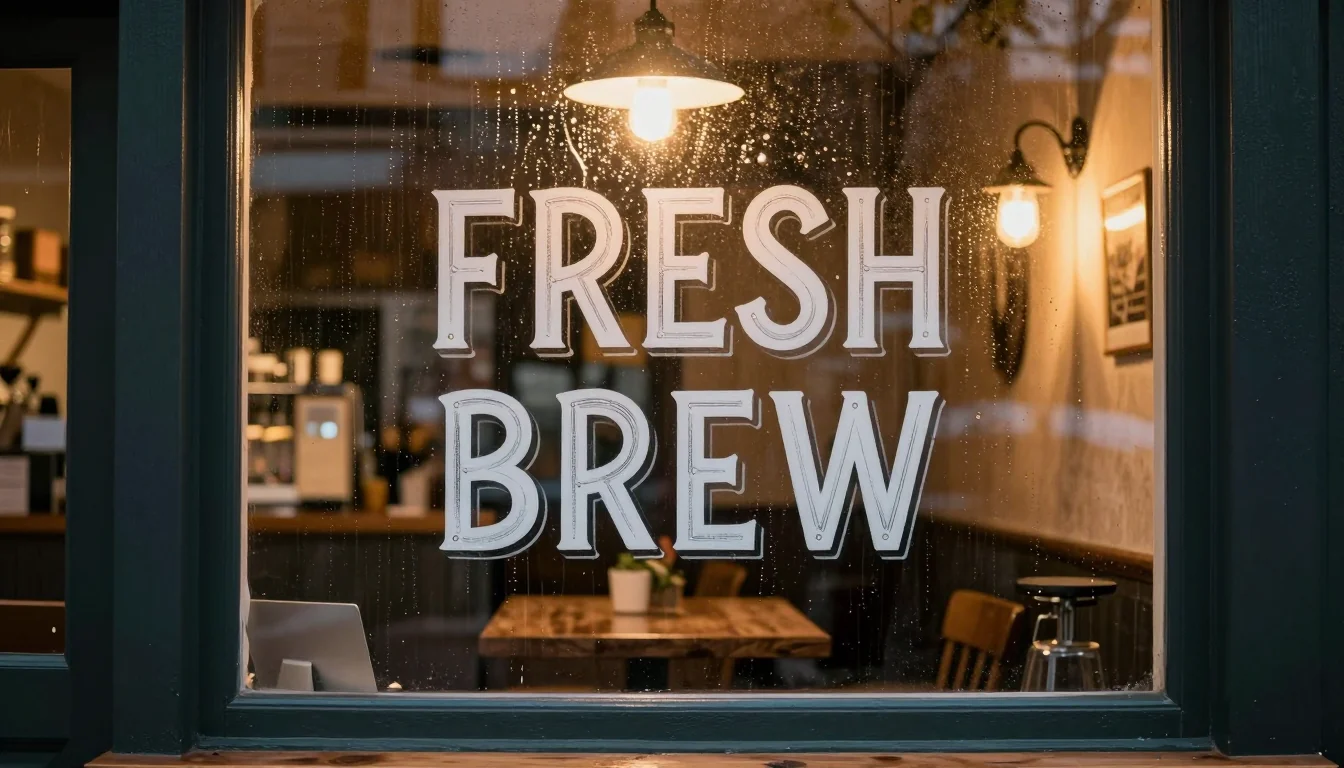
Short English text. My prompt requested lettering reading exactly "FRESH BREW". All letters are right, in a sign-painter style with a drop shadow. The one miss: there was supposed to be a chalkboard, and the model painted the words onto the glass instead.
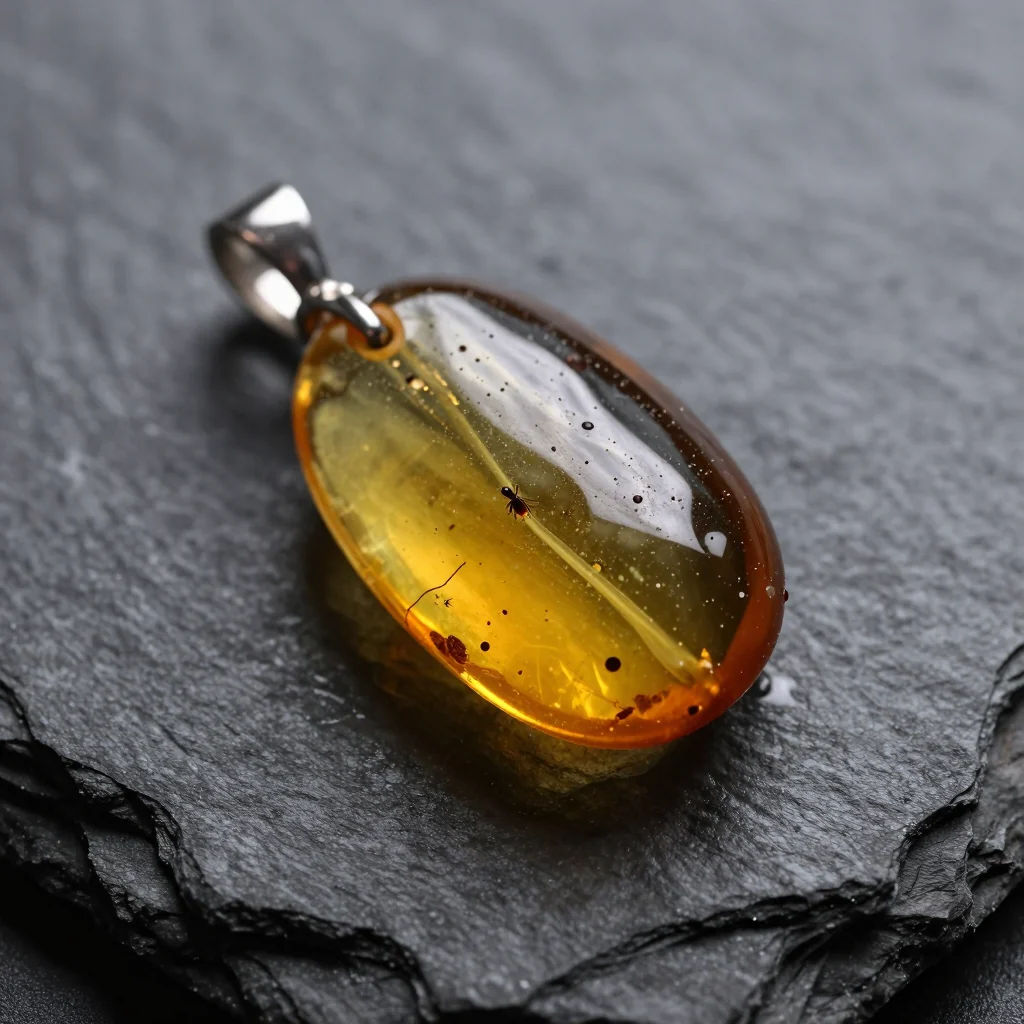
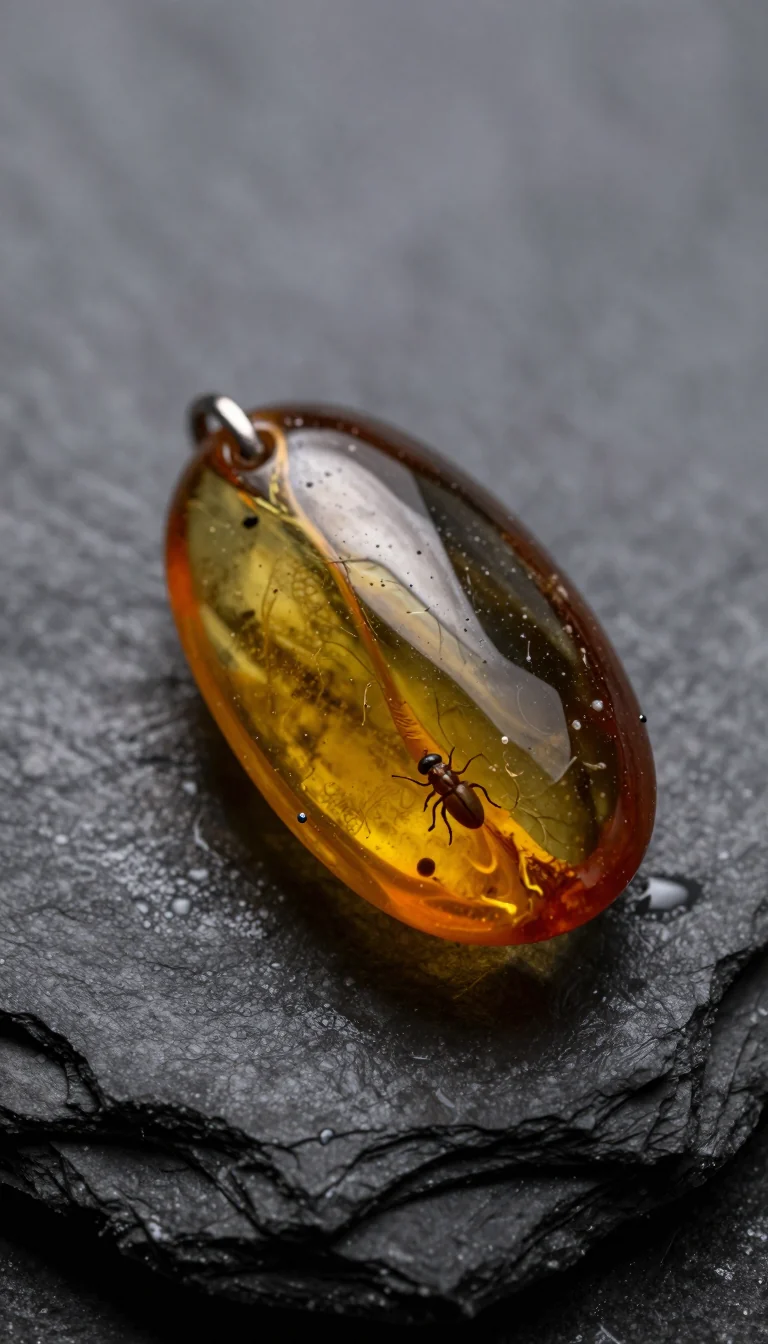
Product photos that look real. Backlit amber, droplets on slate, shallow depth of field. For four seconds of rendering, the detail holds up. Change the ratio and the trapped insect changes too; the AI image prompt guide says why.
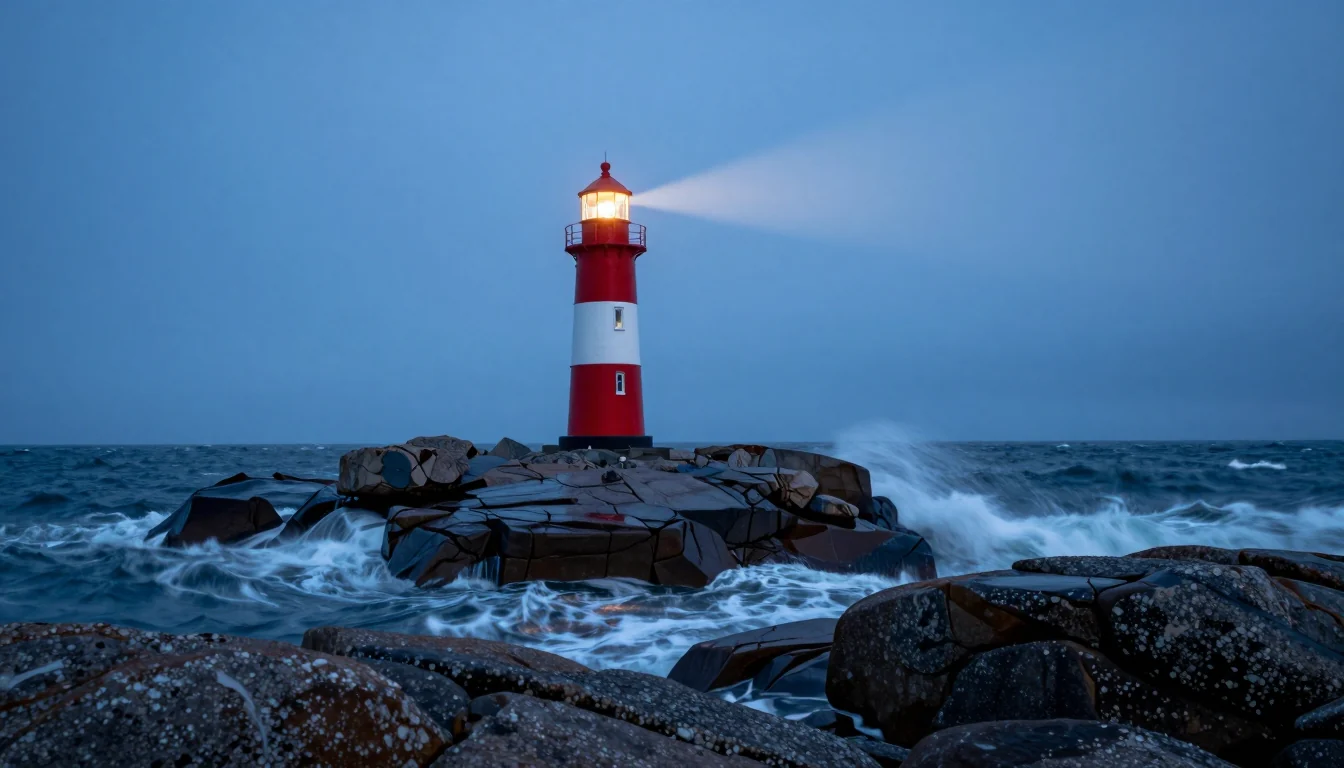
Photo jargon works. Asking for a "24mm wide lens" gave a wider view; "long exposure" turned waves to mist; "blue hour" shifted every color.
Test images: the weak parts
Evidence here comes from two places: the series above, and a Polish-language write-up of mine on promptowy.com where Z-Image Turbo and Qwen-Image 2.1 faced eight prompts on one computer.
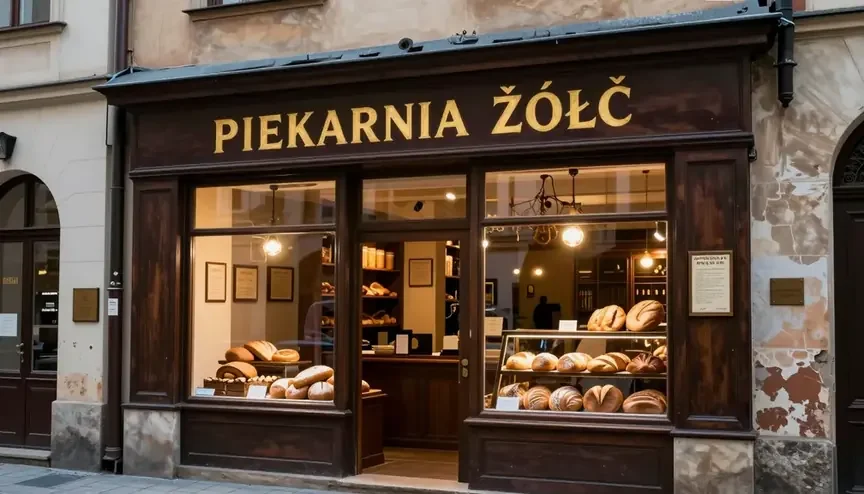
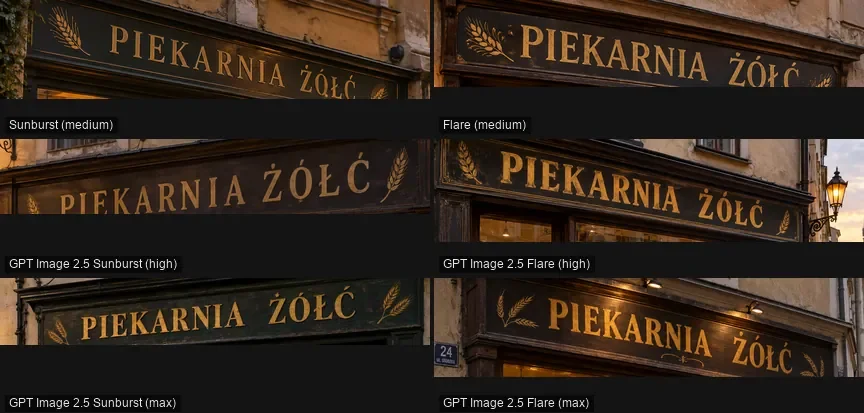
- Diacritics. "PIEKARNIA ŻÓŁĆ" turned into "ŽÓŁČ": two letters got Czech hooks. Put accented words in afterwards with an editor, or use a stronger text renderer (compared in GPT Image 2.5 vs Nano Banana Pro vs FLUX.2).
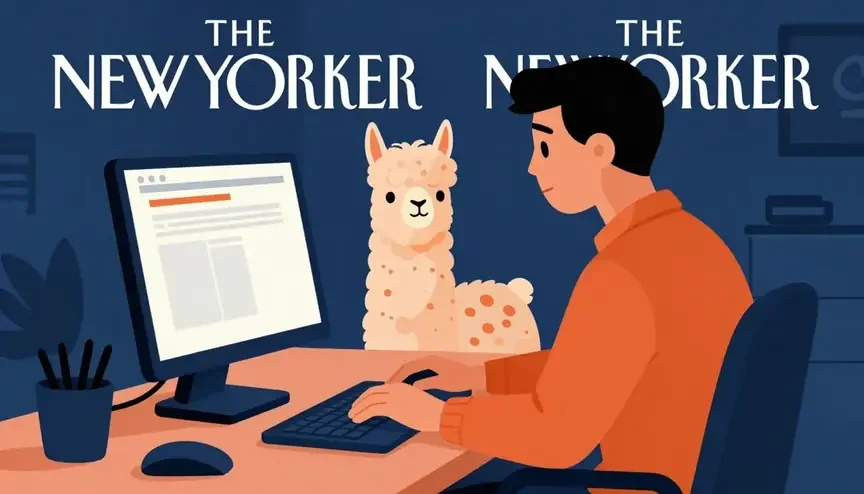
- Uninvited lettering. Naming a well-known magazine as the style reference produced two copies of its title at the top. Spell out the look rather than citing the publication.
- "No text" is not a guarantee. One poster ended its prompt with "no text" and still showed small pseudo-captions at the bottom edge.
- Regional details. Pierogi resembled Italian pasta parcels, and a mountain lake from the Tatras could have been Swiss. General world knowledge is fine; local specifics less so.
- Overall. Ten image models, five shared prompts: Z-Image Turbo finished last with a 5.7/10 average, against 9.0 for Nano Banana Pro. Every result is in my image generator ranking, written in Polish.
That does not make the model useless. It tells you which jobs to keep it away from.
Good fit, bad fit
Reach for it when:
- Volume beats polish: blog images, backgrounds, website mockups.
- You are checking a prompt before paying for a pricier model.
- Text is short and English, or there is none.
- Rough layouts across different frame shapes, fast.
- Mass variant scripts that keep the best and bin the rest.
Pick something else when:
- The text has diacritics.
- Photo edits or reference-driven work, because pictures cannot be uploaded.
- Identical reruns, because seed is not exposed.
- It is a cover or print job where every detail counts.
Turbo or Pro?
Kadraris also carries Z-Image Pro ($0.05 per image).
| Turbo | Pro | |
|---|---|---|
| Request fields | prompt, aspect_ratio | prompt, seed |
| Seed | no | yes (0 or empty = random) |
| Ratio choice | 5 presets | no ratio field |
| Prompt style | up to 1,000 characters | one dense English paragraph, ~90-170 words |
| Image input | no | no |
Pro earns its price when a good result has to be revisited, with the seed locked and just a word or two edited. Turbo remains my choice for volume and drafts. Pro is untested on my side, so there is no quality verdict here.
Code: curl, Python, JavaScript
Only prompt and aspect_ratio are allowed; extras such as seed or num_images produce 422. Your key comes from the dashboard once you sign up.
curl "https://kadraris.com/v1/generate?wait=60" \
  -H "Authorization: Bearer $KADRARIS_API_KEY" \
  -H "Content-Type: application/json" \
  -d '{
    "model": "z-image",
    "input": {
      "prompt": "photo of a tiny bookshop door at dusk, a painted sign reading exactly \"OPEN LATE\", warm lamp light, wet pavement",
      "aspect_ratio": "16:9"
    }
  }'
Python, saving the result to disk:
import os
import requests

API = "https://kadraris.com/v1"
HEADERS = {
    "Authorization": f"Bearer {os.environ['KADRARIS_API_KEY']}"
}

r = requests.post(
    f"{API}/generate",
    params={"wait": 60},
    headers=HEADERS,
    json={
        "model": "z-image",
        "input": {
            "prompt": ("macro product photo of a copper ring on "
                       "dark river stone, one warm backlight, "
                       "shallow depth of field"),
            "aspect_ratio": "1:1",
        },
    },
    timeout=130,
)
r.raise_for_status()
task = r.json()

if task["status"] == "succeeded":
    url = task["output"][0]["url"]
    with open("ring.png", "wb") as f:
        f.write(requests.get(url, timeout=60).content)
    print("saved, cost:", task["cost"])
elif task["status"] == "failed":
    print("failed, not charged:", task["error"])
else:
    print("not ready yet, poll:", task["poll_url"])
JavaScript with fetch (Node 18+):
const res = await fetch(
  "https://kadraris.com/v1/generate?wait=60",
  {
    method: "POST",
    headers: {
      Authorization: `Bearer ${process.env.KADRARIS_API_KEY}`,
      "Content-Type": "application/json",
    },
    body: JSON.stringify({
      model: "z-image",
      input: {
        prompt: "flat vector windmill, three-color palette",
        aspect_ratio: "9:16",
      },
    }),
  },
);
const task = await res.json();
console.log(task.status, task.output?.[0]?.url ?? task.poll_url);
A few practical notes:
- Download right away. Result links expire after a limited time.
- Large batches: use
webhook_urlinstead of?wait=60. - More patterns: for batches and retries read generate images with Python; field reference in the generate docs.
Without code: Studio
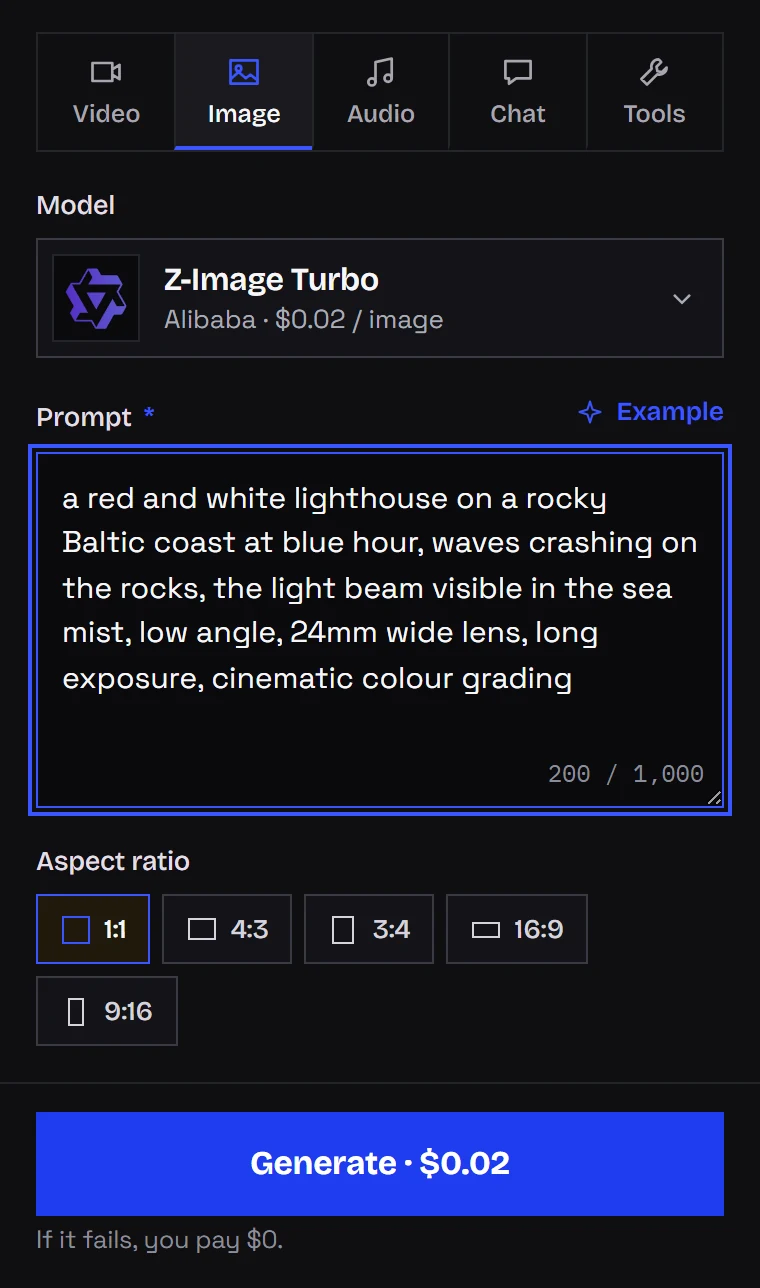
Open Kadraris Studio, select the model, type your prompt, choose a frame shape. That is the entire form, matching what the model accepts. Results are saved to your history.
Your own GPU or the API?
The weights are open, so with the right hardware you can run Z-Image Turbo for free. Here is how it compared on my machine:
| Local (my setup) | Kadraris API | |
|---|---|---|
| Hardware | high-VRAM GPU; up to 18.2 GB used on my RTX 4090 | browser or any server |
| Download | ~20.7 GB (model, text encoder, VAE, bf16) | none |
| Getting started | hours of installing and tuning (for me, alongside other models) | register, add funds, make a key |
| Per picture | ~0.0004 kWh of power (card alone, 350 W x 4.2 s) | $0.02 per image |
| Wait | ~4 s after warm-up | varies with load; typically a single ?wait=60 request |
| Seed and sampler access | full | none |
| Invoices, prepaid funds, zero maintenance | not applicable | included |
Cards with 12-16 GB manage it more slowly as some layers end up in regular RAM. With 8 GB, use a quantized build such as fp8 or GGUF and accept a small quality hit.
My own rule: long runs and seed play stay on the desktop card I already own. Server jobs, automations and clients without serious graphics hardware go through the API.
Questions
Why does my request with num_images: 4 fail?
There is no count field: the model reads prompt and aspect_ratio and returns a single picture. Extra fields return 422. Send four separate requests instead.
Can I choose an exact pixel size?
No. Resolution follows the aspect ratio you pick from the five presets, and there is no separate size field.
How do I fix wrong Polish or Czech letters in the image?
Leave the text out of the prompt and add it in an image editor, or use a model that renders diacritics more reliably. Z-Image Turbo handles English and Chinese text.
Can I sell images made with it?
Yes: the weights ship under Apache 2.0, which covers commercial work. You remain responsible for what the image shows, for example real people's likenesses or trademarks.