Photo to Video with AI: Start Frames, End Frames and References Explained
Image to video AI in practice: prep the photo, write a motion prompt, use start/end frames or references in Kling 3.0, Seedance, MiniMax H3 or Veo.
 Piotr Olszewski2026-10-2211 minPolski
Turning a photo into a clip works like this: you give a video model such as Kling 3.0, Seedance 2.5 or MiniMax H3 your image as the opening frame, write a prompt that describes only the movement, choose a length, and download the MP4 after a minute or a few. Kadraris lets you run this from a browser tab in Studio or with a single POST /v1/generate request. You pay per second of video (Kling 3.0 is from $0.0963 per second), and a failed generation is free.
Below: the three ways a model can use your image, how to prepare the photo, how to word the motion, which models accept what, and the code.
Three modes, three results
- Start frame. You send one image. The clip opens on exactly that frame and the model makes up the movement. Good for animating a photo, a packshot or an illustration.
- Start and end frame. You send two images. The model creates the path from the first to the second. Good for transformations, transitions and before-and-after shots.
- References. You send 1 to 30 images, depending on the model. Whatever is in them (a person, a product) appears in a new scene, and the model chooses the framing. Good for keeping one character or product consistent across shots.
One image produces one shot. When people say "a video from several photos", they mean either a reference generation or several start-frame clips joined in an editor.
Prepare the photo first
The model takes your image as it is. A weak photo leads to a weak clip, and no prompt can rescue it. Before paying for video seconds I check:
- Sharpness. The image should be at least as large as the output resolution. A photo squashed by a messenger app gets softer once it starts moving.
- Shape. A vertical image makes a vertical clip. With an image attached, Kling ignores
aspect_ratio, and MiniMax H3 refuses it in image-to-video mode. - Space around the subject. Leave a margin between the subject and the frame edge when the camera is meant to move closer or circle.
- No lettering. Text tends to bend once things move. Add captions later in your editor.
- Permission. Stick to images you own or license, and get a person's consent before you animate their photo. Producers' content filters may also block a recognizable face. A blocked task counts as failed and costs nothing.
Good opening frames are cheapest to get from an image model. The lighthouse below came from Z-Image Turbo on my own machine, and Kling later animated it:
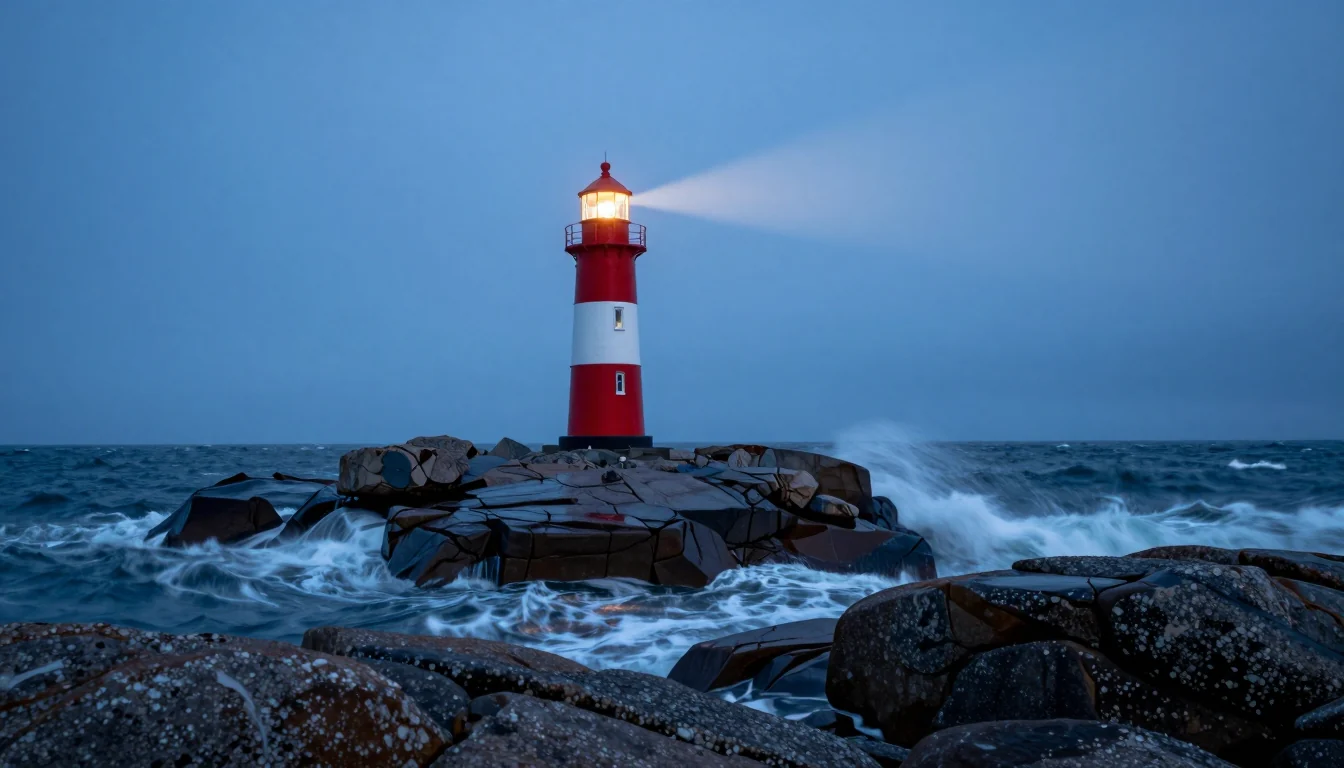
A Z-Image Turbo image costs $0.02 per image, a small part of one video second. That is why composition gets decided on stills, before any video is rendered. For writing those still prompts, see my prompt guide for AI images, and all image models are on the AI image generator page.
Describe the motion, not the picture
Beginners often describe what the image already shows. The lighthouse is already in the frame; the model knows. What it needs from you is the change.
The prompt behind the Studio screenshot below:
The lighthouse beam slowly sweeps across the sea mist,
waves crash on the rocks, camera slowly pushes in
It has three ingredients: movement in the scene (beam, waves), a pace (slowly), and one camera move (push in). Not two, not three. More camera wording: camera move prompts for AI video.
A product case. An amber pendant photographed upright, to be turned into 5 seconds of 9:16 video:
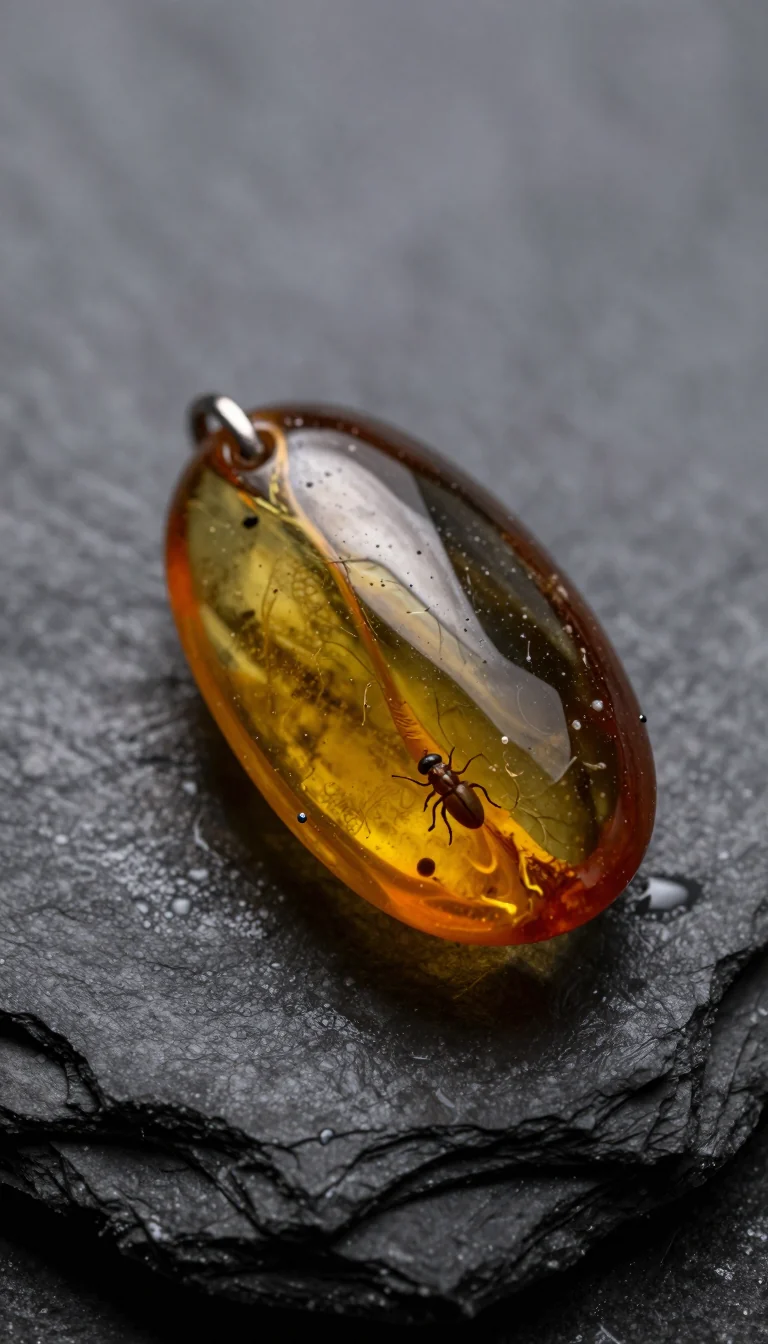
Slow orbit around the amber pendant, the backlight slowly brightens
and the amber starts to glow, tiny water droplets glisten on the slate,
macro, shallow depth of field
Movement that usually looks good:
- natural motion like hair in the wind, rising steam, rolling waves, drifting smoke,
- unhurried camera work such as a push-in, a pull-back or an orbit,
- one simple gesture: turning the head, smiling, raising a cup.
Movement that usually falls apart: sprinting, dance moves, a group where each person acts differently, and half turns of 180 degrees, because the model must invent the side of the subject that the photo does not show.
ByteDance's own image-to-video demo for Seedance 2.0, where the prompt covers only the action:
Models that accept images
The limits below come from the Kadraris catalog, which is what Studio and the API accept.
| Model | Frames | References | Length |
|---|---|---|---|
| Kling 3.0 | start, end | up to 2 images | 3 to 15 s |
| Seedance 2.5 | start, end | 30 images, 10 clips, 10 audio | 4 to 30 s |
| Seedance 2.0 | start, end | up to 9 images | 4 to 15 s |
| MiniMax H3 | start, end | 9 images, 3 clips, 3 audio | 4 to 15 s |
| Veo 3.1 (Quality) | up to 3 images as frames | none | 8 s |
| Wan 3.0 | start, end | up to 10 images | 2 to 30 s |
| Grok Imagine Video 1.5 | one image only | none | 6 to 15 s |
Resolution options: Kling 3.0 and Veo 3.1 give 720p, 1080p or 4K. Seedance 2.5 gives 480p, 720p or 1080p. Seedance 2.0 and Wan 3.0 go from 480p to 4K. MiniMax H3 gives 768P or 2K. Grok Imagine Video 1.5 gives 480p or 720p.
Prices: Kling 3.0 from $0.0963 per second, Seedance 2.5 from $0.261 per second, Seedance 2.0 from $0.157 per second, MiniMax H3 from $0.161 per second, Veo 3.1 from $2.53 per video, Wan 3.0 from $0.0777 per second, Grok Imagine Video 1.5 from $0.088 per second. A "from" price is the lowest resolution tier. Veo 3.1 is charged per 8-second clip, not per second.
My own choice:
- Kling 3.0 if the result must not drift far from the photo, or if someone has to speak.
- Seedance 2.5 if the take is long and needs audio.
- MiniMax H3 if the delivery format is 2K.
Some time ago, for a test on my Polish blog, a fox image made in Grok Imagine got its motion from MiniMax H3. I still work that way: the still from one model, the motion from another. Model-by-model costs: Kling 3.0 pricing, Veo 3.1 pricing, MiniMax H3 and Hailuo API.
Doing it in Kadraris Studio
- Go to Studio and open the Video tab. If you have no account, sign up and add at least $10.
- Pick a model from the table, for example Kling 3.0.
- Open Start frame (URL). Paste a link or press Upload file (PNG, JPG or WebP, max 25 MB).
- Use Prompt for the movement in the scene and the camera's path.
- Choose the length. My first try is always the minimum, 3 to 5 seconds on Kling.
- Sound is optional: tick Generate audio to get it (on Kling the box starts unticked).
- Look at the price and press Generate.
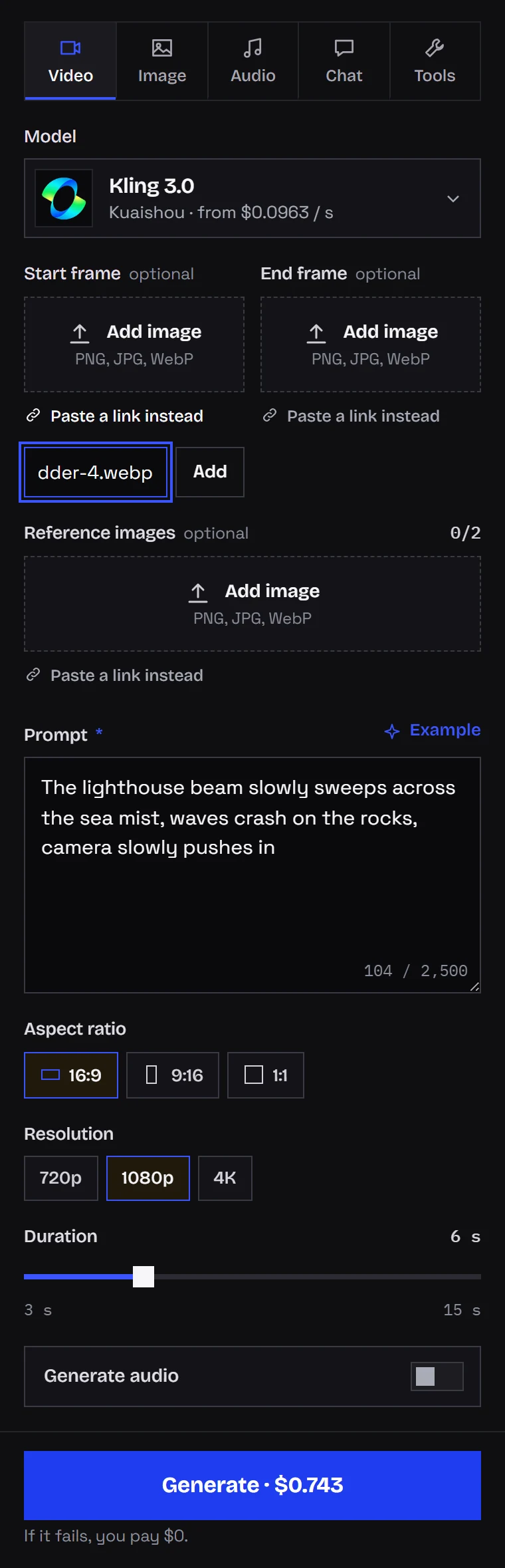
The clip appears in your history when it is done. Download the MP4 straight away, since result links stop working after some time.
Two frames for a transition
Give the model two images and it builds the change between them. This is the simplest route to controlled transformations: day into night, a sketch into a finished product, a closed box opening.
Studio has an End frame (URL) field right under the start frame; API users send end_image_url. Kling 3.0, both Seedance versions, MiniMax H3 and Wan 3.0 support it.
How I prepare a pair:
- Both images share the same ratio and similar light. If they do not, you get a jump rather than a blend.
- The prompt is about the change itself, such as "the shell splits and warm light spills out".
- The clip gets enough time. Three seconds of transformation looks like a cut; six to eight seconds looks like an effect.
Alibaba's start and end frame demo for Wan 2.7:
References for a recurring character
A start frame fixes the composition. References fix how a character or product looks and let the model decide the framing. That is how I make a series with one character: I make two stills, a close-up of the face and one showing the whole figure, attach both as Reference images, and write a different scene for each clip. More on this in consistent characters in AI video.
What each model allows:
- Seedance 2.5: as many as 30 images plus 10 clips and 10 audio files; references may show real people.
- Seedance 2.0: with 1 or 2 images in
image_urlsit animates them; with more, they work as references. - Wan 3.0: a maximum of 10 images, called by number in the prompt ("Image 1", "Image 2").
- MiniMax H3: carries over the face, the movement and the voice from what you attach; up to 5 images are included in the base price.
As a rule, one task uses either frames or references. Seedance 2.0 is an example: a frame pair cannot be combined with reference video or reference audio. The two Seedance versions are compared in Seedance 2.0 vs 2.5.
The API version
Put a public link to the image in image_url (start frame) and, if you want, end_image_url (end frame). Endpoint reference: generate docs.
curl https://kadraris.com/v1/generate \
  -H "Authorization: Bearer $KADRARIS_API_KEY" \
  -H "Content-Type: application/json" \
  -d '{
    "model": "kling-3.0",
    "input": {
      "prompt": "The lighthouse beam slowly sweeps across the sea mist, waves crash on the rocks, camera slowly pushes in",
      "image_url": "https://example.com/frames/lighthouse.webp",
      "duration": 5,
      "resolution": "1080p"
    }
  }'
The answer is an immediate 202 with the task id and estimated_cost. Then you check for the result. Python version:
import os, time, requests

API = "https://kadraris.com/v1"
KEY = os.environ["KADRARIS_API_KEY"]
HEADERS = {"Authorization": f"Bearer {KEY}"}

body = {
    "model": "kling-3.0",
    "input": {
        "prompt": "The lighthouse beam slowly sweeps "
                  "across the sea mist, waves crash on "
                  "the rocks, camera slowly pushes in",
        "image_url": "https://example.com/frames/"
                     "lighthouse.webp",
        # optional end frame:
        # "end_image_url": "https://example.com/"
        #                  "frames/night.webp",
        "duration": 5,
        "resolution": "1080p",
    },
}
task = requests.post(f"{API}/generate", headers=HEADERS,
                     json=body, timeout=30).json()
print(task["id"], task["estimated_cost"])

# poll with a growing pause, capped at 15 s
delay = 2
while True:
    task = requests.get(f"{API}/tasks/{task['id']}",
                        headers=HEADERS,
                        timeout=30).json()
    if task["status"] in ("succeeded", "failed"):
        break
    time.sleep(delay)
    delay = min(delay * 1.5, 15)

if task["status"] == "succeeded":
    url = task["output"][0]["url"]
    data = requests.get(url, timeout=120).content
    with open("clip.mp4", "wb") as f:
        f.write(data)
    print("saved clip.mp4, cost:", task["cost"])
else:
    print("failed, nothing charged:", task["error"])
Fields that differ between models:
- Veo 3.1 has no
image_url. Useimage_urls, a list of up to 3. Length is always 8 s. - MiniMax H3 does not accept
aspect_ratioin image-to-video mode. Leave it out. - Kling 3.0 follows the image shape and ignores
aspect_ratiowhen an image is attached. - Seedance 2.5 switches to
adaptiveratio when you send both start and end frames.
GET /v1/models/{id} returns the full schema per model. When jobs run long, use a webhook instead of the loop; the pattern is in async AI video with webhooks.
What it costs
The bill is the per-second rate multiplied by the length. Attaching a start frame is free on Kling, Seedance and MiniMax H3. You pay more only when you add reference video (those seconds count too) or when MiniMax H3 gets six or more reference images.
For a 5-second clip:
- Kling 3.0: 5 times the rate for your resolution (from $0.0963 per second).
- Seedance 2.5: 5 times the rate, cheapest at 480p (from $0.261 per second).
- MiniMax H3: 5 times the rate, with 2K priced above 768P (from $0.161 per second).
- Veo 3.1 (Quality): billed as a single 8-second clip (from $2.53 per video).
The price appears beside the Generate button in Studio; over the API it arrives as estimated_cost before anything runs. The balance is prepaid from $10, without a subscription, and it does not expire. For rates at every resolution see pricing; for a cross-model view, AI video cost per second.
Four mistakes I see often
- The prompt repeats the photo. Write what changes, not what is there.
- Too much at once. Pack several actions and camera moves into 5 seconds and the clip turns jittery.
- The wrong source shape. Crop a landscape photo to vertical before you make a 9:16 clip.
- Going long on the first try. Test the motion at the minimum length, then extend.
Questions
Can I bring an old family photo to life?
Yes. Scan it as large as you can and ask for small movements: a blink, a faint smile, a slow push-in. Big motion pulls the face away from the original, so the less movement, the more it still looks like the person.
Which files can I upload as a start frame?
Studio takes PNG, JPG or WebP files of 25 MB or less, or a link to an image hosted somewhere. Over the API, only a public link works.
Will the clip have sound?
If the model makes audio. That covers Kling 3.0 (with the audio box ticked), both Seedance versions, Wan 3.0, MiniMax H3 and Grok Imagine Video 1.5. Put the sounds in the prompt, such as "waves and seagulls".
Is there a free way to try image-to-video on Kadraris?
Not for free. Kadraris has no trial credit; you start with a $10 top-up that never expires, and nothing is charged for failed jobs. A few model producers run limited trials inside their own apps.